

Why Your SaaS Content Is Bleeding Revenue (And How to Fix It)
A content audit for saas companies reveals the hidden goldmine sitting in your existing content library. Instead of constantly creating new blog posts and landing pages, smart SaaS marketers first optimize what they already have.
Quick Answer: What is a SaaS Content Audit?
- Systematic review of all your website content (blogs, landing pages, product docs, case studies)
- Performance analysis using traffic, conversions, and engagement data
- Strategic decisions to keep, update, consolidate, or remove each piece
- SaaS-specific focus on buyer journey stages, trial conversions, and feature adoption
- Goal: Boost organic rankings and revenue from content you already own
Your SaaS faces unique content challenges. You have feature pages that need constant updates. Product documentation that affects user onboarding. Free trial CTAs scattered across hundreds of pages. Landing pages for different buyer personas. And blog content covering everything from industry trends to technical tutorials.
Most SaaS companies are sitting on content gold mines they don't even know exist.
Bill Gates was right when he said "content is king" back in 1996. But today, optimized content is what actually drives revenue. A systematic audit helps you find the pages that are one optimization away from ranking higher, converting better, and driving more qualified demos.
What is the difference between a general content audit and a SaaS-specific one? You're:
- Not just looking at traffic numbers.
- Tracking which content moves prospects through a complex B2B buyer journey.
- Measuring how blog posts influence trial sign-ups.
- Analyzing whether your feature pages actually help users adopt your product.
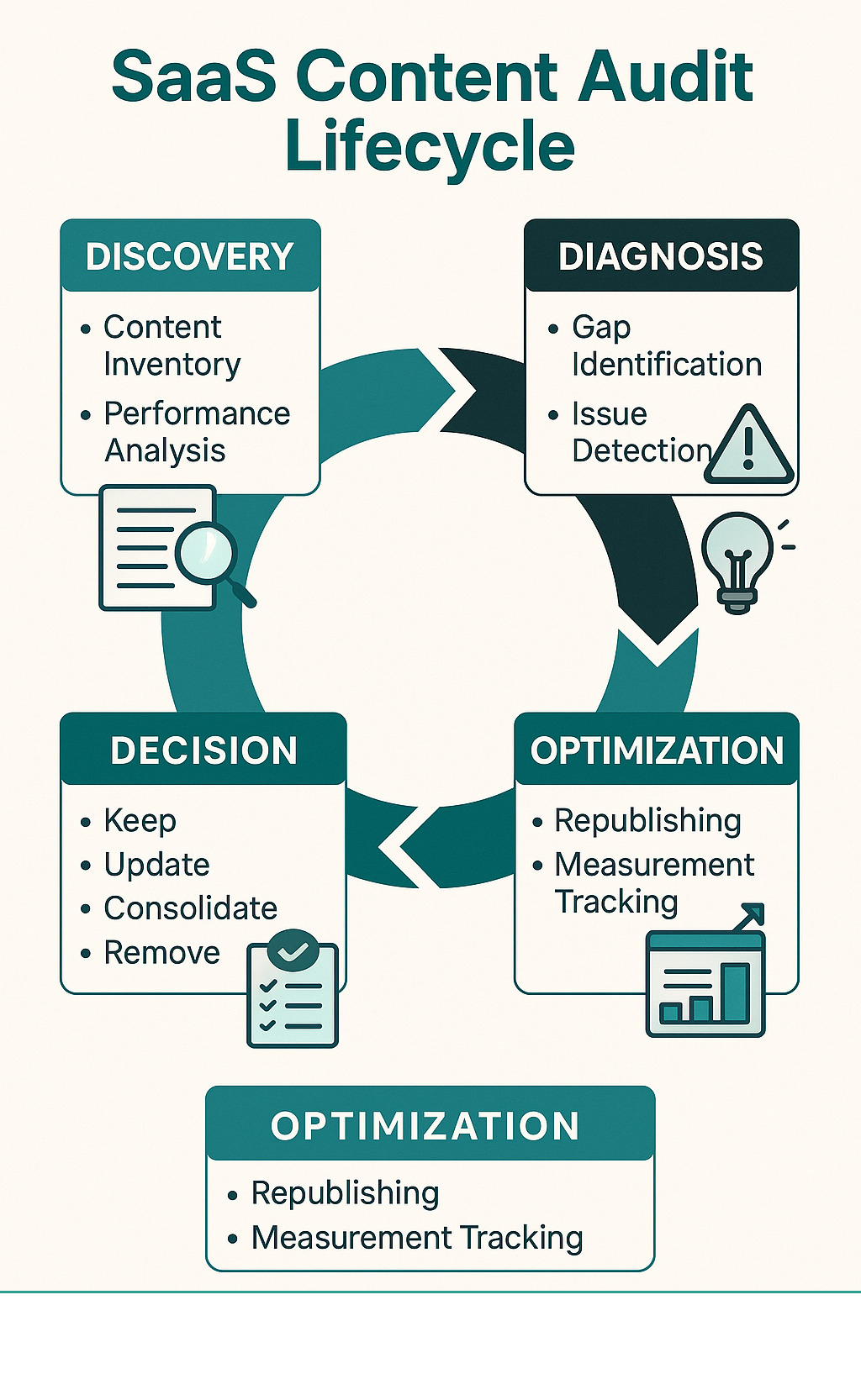
Content audit for saas terms to know:
Why This Guide Exists
We've seen too many SaaS companies struggle with the same content pain points. Your marketing team creates dozens of blog posts, case studies, and feature pages. Traffic grows slowly. Demo requests trickle in. You wonder if you should just create more content.
But here's what we've learned: the problem isn't volume. It's optimization. Most SaaS content libraries contain underperforming gems that could drive significant organic growth with the right tweaks.
When your organic growth stalls, your first instinct might be to publish more. But smart SaaS marketers audit first, optimize second, then scale strategically. This approach typically delivers faster results with less resource investment.
Who Should Read
This guide is for marketing operations managers, content leads, RevOps professionals, and founders who want to maximize their existing content investment. If you're responsible for driving organic growth, improving conversion rates, or optimizing marketing ROI, this framework will help you identify quick wins and strategic opportunities.
What Is a SaaS Content Audit & Why It's Mission-Critical
Let's get one thing straight: a content audit for saas companies isn't just making a fancy spreadsheet of everything on your website. That's a content inventory, and while useful, it's only the starting point.
A real content audit digs deeper. You're systematically evaluating every piece of content to understand how it's performing, where it's failing, and what specific actions will boost its impact. Think of it as a health checkup for your content—except instead of checking your blood pressure, you're measuring organic traffic, conversion rates, and pipeline contribution.
Here's why this matters so much for SaaS companies specifically. Your content isn't just competing for attention—it's doing heavy lifting throughout an incredibly complex buyer journey. A prospect might read your blog post about industry trends in January, download a comparison guide in March, attend your webinar in May, and finally request a demo in July.
During those six months, they're probably evaluating three other solutions, getting buy-in from their boss, and trying to figure out if your tool actually solves their specific problem. Your content needs to support every step of this marathon decision-making process.
But here's where it gets even trickier. Once someone becomes a customer, your content job isn't done. Those same prospects now need onboarding help, feature tutorials, and troubleshooting guides. Poor content at this stage can turn a successful sale into a churned customer.
The SaaS buyer journey isn't linear either. People jump around. They might start with a technical tutorial, then read a case study, then check out your pricing page, then go back to read more blog posts. Your content audit needs to account for this chaotic, multi-touchpoint reality.
How It Differs From General Audits
Most content audit advice online assumes you're running an e-commerce site or a simple lead generation business. But SaaS companies have unique content challenges that require a different approach.
Feature pages are probably your biggest headache. Every time your product team ships an update, your marketing content becomes a little more outdated. During an audit, you'll often find feature pages describing capabilities that changed months ago, or worse, features that no longer exist.
Documentation and tutorials directly impact whether new users actually adopt your product. Unlike a blog post that just needs to drive traffic, your help content needs to turn confused new users into successful power users. When this content is outdated or unclear, it shows up in your churn metrics.
Free trial CTAs appear everywhere on your site, but they're probably not all performing equally. Some pages convert visitors to trials at 8%, while others struggle to hit 1%. A SaaS audit identifies these conversion gaps and helps you understand why some CTAs work better than others.
Product update announcements can become a liability if they're not maintained properly. Nothing confuses prospects like reading about your "exciting new feature" that launched two years ago and has since been replaced by something completely different.
Integration guides and use case pages targeting specific industries add another layer of complexity. These pages often rank well for niche keywords but may not reflect current product capabilities or market positioning.
The bottom line? A general content audit might tell you which blog posts get the most traffic. A content audit for saas companies tells you which content actually moves people through your funnel and keeps them as happy customers.
Core Goals & Objectives
When auditing SaaS content, you aim to accomplish several goals simultaneously. It's like conducting an orchestra where every instrument needs to play its part perfectly.
SEO performance is usually the most obvious starting point. You want to find those frustrating pages stuck on page two of Google that could reach page one with some optimization work. You're also hunting for keyword cannibalization—those awkward situations where three of your blog posts are competing against each other for the same search term.
Conversion optimization gets more interesting with SaaS content because you have multiple conversion goals. Some pages should drive trial sign-ups. Others should generate demo requests. Still others should move existing users toward upgrading their plans. Your audit needs to evaluate whether each page is optimized for the right conversion goal.
User experience matters more for SaaS companies because your prospects are doing serious research. They're not impulse buying—they're trying to solve real business problems. If your content feels disorganized or contradictory, they'll go find a competitor who seems to have their act together.
Revenue attribution is where things get really strategic. You want to understand which blog posts actually influence deals that close. Which case studies get shared in prospect conversations? Which feature pages correlate with higher customer lifetime value? This data helps you prioritize optimization efforts based on actual business impact.
Customer retention often gets overlooked in content audits, but it's crucial for SaaS companies. Your onboarding content, feature documentation, and help articles directly impact whether customers stick around. Poor content here doesn't just hurt your search rankings—it hurts your recurring revenue.
Key Benefits Backed by Data
The numbers don't lie: most SaaS companies are sitting on massive untapped potential in their existing content libraries.
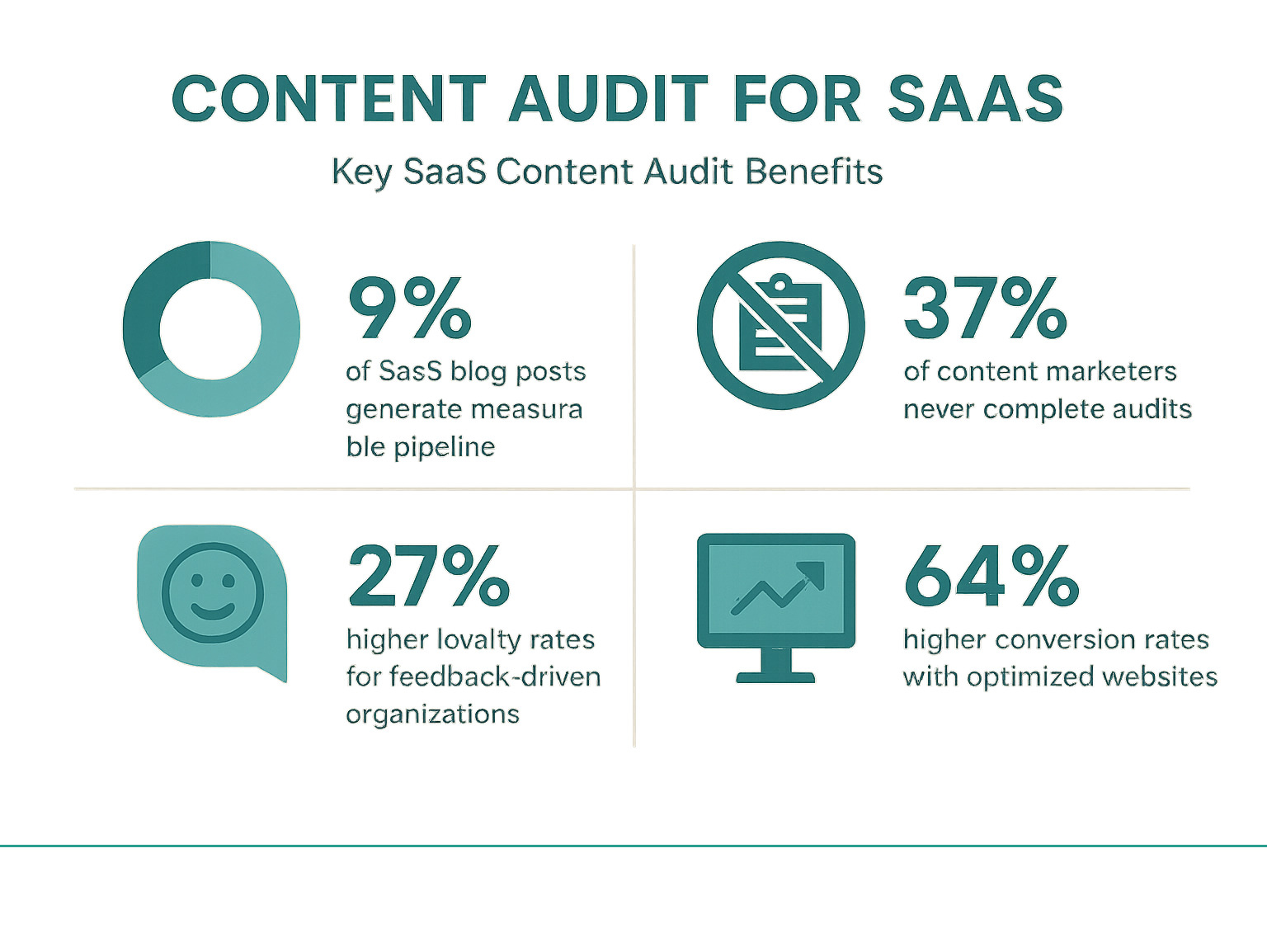
The revenue impact can be dramatic. Companies that take content auditing seriously often see significant improvements in both organic growth and conversion rates. The key is moving beyond vanity metrics like page views and focusing on metrics that actually correlate with business outcomes.
Think about it this way: if only 9% of your current blog posts drive measurable results, imagine what happens when you optimize even half of the remaining 91%. You don't need to create more content. You need to make your existing content work harder. That's exactly what a systematic content audit for saas companies accomplishes.
Content Audit for SaaS: 7-Step Action Framework
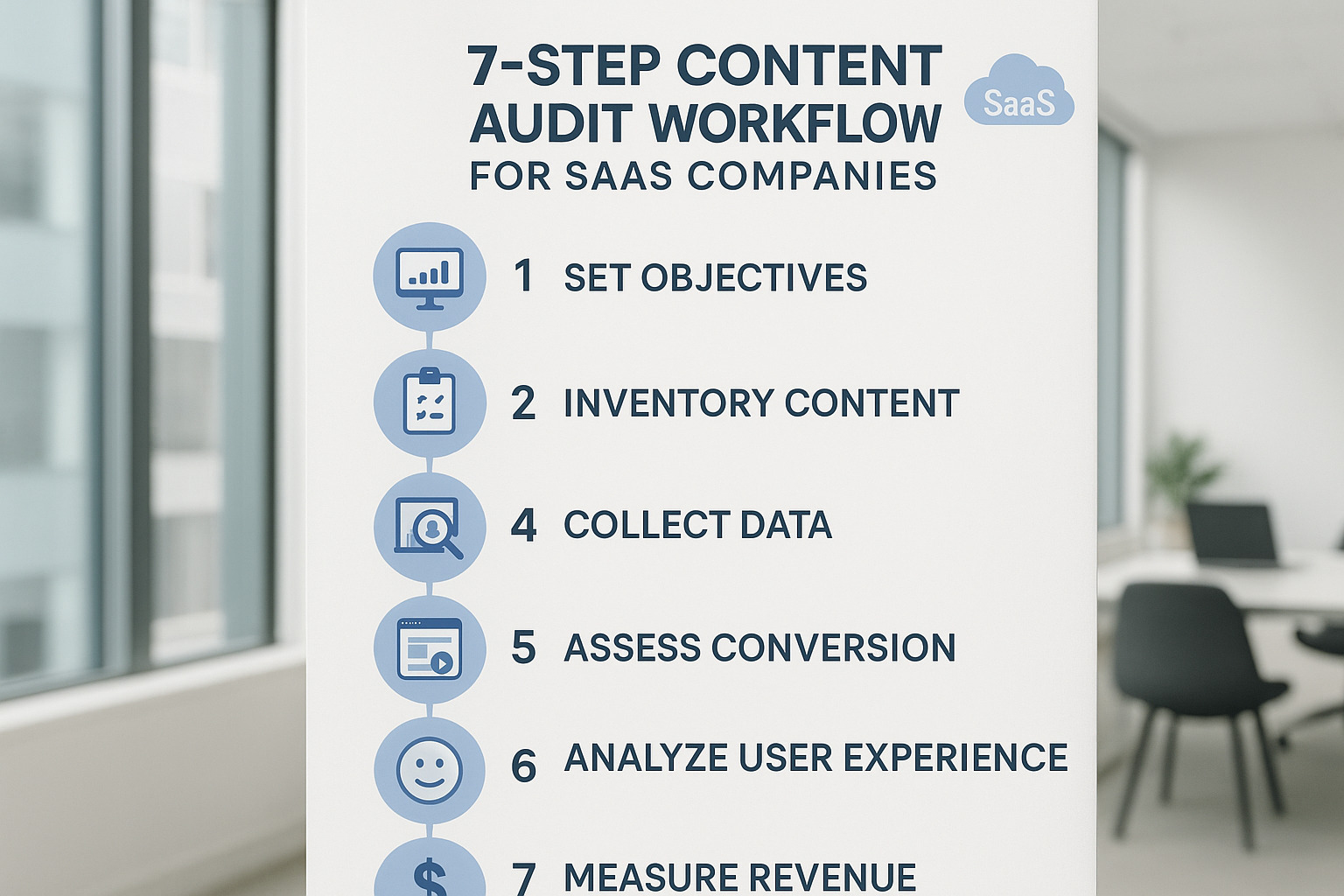
Think of a content audit for saas companies like a health checkup for your website. Just as you wouldn't skip your annual physical, your content needs regular examination to stay healthy and perform at its best. We've refined this seven-step framework through countless audits, and it consistently delivers measurable improvements in organic traffic, conversion rates, and revenue attribution.
The beauty of this framework lies in its systematic approach. Instead of randomly optimizing pages or creating new content on a whim, you'll make data-driven decisions that directly impact your bottom line. Each step builds on the previous one, creating a comprehensive picture of your content's performance and potential.
Step 1 – Prep Your content audit for your SaaS business
Before diving headfirst into spreadsheets and analytics dashboards, take a step back and establish a solid foundation. Many audits fail spectacularly because teams become overexcited and attempt to audit everything at once. That's like trying to renovate your entire house in one weekend: ambitious, but not particularly smart.
Begin by clearly defining your audit scope. For most SaaS companies, we recommend beginning with your core content types: blog posts, landing pages, feature pages, and case studies. You can always expand to include documentation and help articles in future audits, but trying to tackle everything at once leads to analysis paralysis.
Next, refresh your ideal customer profiles. Your ICPs should guide every audit decision you make. If your target market has evolved (and let's be honest, in SaaS it always does), your content strategy needs to reflect those changes. Gather recent customer feedback, pick the brains of your sales team, and review any market research you've conducted. This groundwork prevents you from optimizing content for yesterday's customers.
Set specific, measurable objectives that go beyond vague goals, such as "improve SEO." Instead, aim for concrete targets, such as "increase organic traffic to our pricing page by 25% within 90 days" or "improve our blog-to-trial conversion rate from 0.8% to 1.2%." These clear OKRs keep your team focused and make it easier to measure success.
Secure stakeholder buy-in early. Content audits require collaboration across teams—sales insights, customer success feedback, and product team updates all play crucial roles. Secure commitments from these teams upfront, and document your strategy so that everyone understands the goals and process.
Finally, prepare your tools and ensure you have the necessary access permissions. Set up Google Analytics, Search Console, your CRM, and any SEO tools you'll use. Create a master spreadsheet template for tracking findings and recommendations. Trust us, having everything ready before you start saves hours of frustration later.
Step 2 – Crawl & Compile a Complete Inventory
Now comes the detective work. You need to find every piece of content on your website, including those forgotten pages lurking in the depths of your site structure. This step often reveals surprising findings: duplicate content you didn't know existed, orphaned pages with no internal links, and sometimes even entire sections of your site that have been ignored for months.
Start with Screaming Frog to crawl your entire website. The free version handles up to 500 URLs, which works perfectly for smaller sites. For larger sites, the paid version offers unlimited crawling and advanced filtering options, making your life much easier. Don't worry if the interface looks intimidating at first—it's actually quite straightforward once you get the hang of it.
Export data from Google Search Console to get a complete list of indexed pages. This step is crucial because it reveals pages that Google recognizes but might not appear in your sitemap. Sometimes you'll find pages ranking for keywords you didn't even know you were targeting.
Generate XML sitemaps using tools like XML-Sitemaps.com for a structured view of your site architecture. This reveals how your content is organized and whether important pages are correctly linked within your site structure.
Clean and deduplicate your data by removing non-content URLs, such as images, PDFs, and system pages. Focus on HTML pages that contain substantial content. Create clear categories for different content types, such as blog posts, landing pages, feature pages, case studies, and so on. This organization makes the analysis phase much more manageable.
For a detailed walkthrough of this process, including advanced techniques for large, complex websites, check out our Content Inventory guide.
Step 3 – Enrich With Performance & Conversion Data
A raw list of pages tells you absolutely nothing useful. The real magic happens when you layer performance data onto your inventory, changing a simple spreadsheet into a goldmine of actionable insights.
Pull Google Analytics 4 data for each page, including sessions, users, bounce rate, and average session duration. Look at the last 12 months to account for seasonal variations—B2B traffic patterns can be surprisingly cyclical. Pay special attention to pages with high traffic but low engagement, as these often represent quick optimization wins.
Export CRM data to understand which content influences actual business results. If you're using HubSpot, pull assisted conversions data to see which pages contribute to deals. Track form submissions, demo requests, and trial sign-ups by page. This data reveals your true high-performers versus your vanity traffic generators.
Map content to buyer journey stages by tagging each page as top-of-funnel (TOFU), middle-of-funnel (MOFU), or bottom-of-funnel (BOFU). Analyze whether you have appropriate content coverage for each stage. Many SaaS companies find that they have dozens of awareness-stage blog posts but almost nothing for high-intent prospects who are ready to buy.
Analyze time-on-page metrics carefully. Pages with high traffic but low time-on-page often indicate content quality issues or mismatched search intent. These pages are attracting visitors but failing to engage them—prime candidates for optimization.
Don't forget mobile performance. With most B2B traffic now coming from mobile devices, it is essential to analyze mobile-specific metrics separately. Pages that perform well on desktop but poorly on mobile need immediate responsive design improvements.
Step 4 – Diagnose Issues & Identify Gaps
This is where your inner detective really shines. You'll analyze your enriched data to identify specific problems and opportunities, combining quantitative analysis with qualitative judgment. Think of it as diagnosing what's wrong with your content and prescribing the right treatment.
Look for keyword cannibalization issues where multiple pages compete for the same search terms. This dilutes your SEO authority and confuses search engines about which page to rank. Use tools like Semrush or Ahrefs to identify these conflicts—you'll often find three or four pages all trying to rank for the same keyword.
Identify content decay by finding pages that previously ranked well but have lost traffic over time. These pages often just need updates with fresh data, new examples, or expanded coverage of the topic. Sometimes a simple refresh can restore them to their former glory.
Audit your bottom-of-funnel content coverage. Many SaaS companies over-invest in top-of-funnel blog posts while neglecting the comparison pages, use case studies, and implementation guides that high-intent prospects desperately need. These gaps in your content funnel can cost you qualified leads.
Analyze persona coverage systematically. Does your content adequately address each buyer persona's specific pain points and questions? Your sales team can provide invaluable insights about common objections that aren't addressed in existing content. These gaps represent content opportunities that directly support your sales process.
Conduct competitor gap analysis to find topics your competitors cover that you don't. Tools like Ahrefs' Content Gap feature can reveal keyword opportunities you're missing entirely. Sometimes the most significant wins come from covering topics your competitors have already validated.
Document technical issues like slow load times, broken links, or poor mobile experience. These technical issues can prevent otherwise excellent content from ranking and converting effectively. They're often the easiest fixes with the biggest impact.
Step 5 – Decide Actions: Keep, Update, Consolidate, Remove
Now comes decision time. Based on your analysis, you'll categorize each piece of content into one of four action buckets. This framework helps you make systematic decisions about your entire content library, rather than optimizing randomly.
Keep as-is applies to your high-performing pages that don't need immediate changes. These might be your top-ranking blog posts or highest-converting landing pages. Document why these pages work well so you can replicate their success in future content creation.
Update covers pages with good potential that need optimization. This might include refreshing outdated statistics, adding new sections, improving headlines, or enhancing CTAs. Prioritize these updates based on traffic volume and conversion potential—a small improvement to a high-traffic page delivers more impact than a big improvement to a page nobody visits.
Consolidate addresses the common problem of multiple pages covering similar topics. Three separate blog posts about email marketing features might work much better as one comprehensive guide. When you consolidate, set up proper 301 redirects from the old pages to the new consolidated version to preserve SEO value.
Remove applies to truly outdated or low-value pages that serve no purpose. This might include old product announcements, discontinued feature pages, or thin content that provides no real value. Use 301 redirects to send any existing traffic to relevant alternative pages.
Create a quick wins list of updates that can be completed rapidly but will have an immediate impact. These might include fixing broken links, updating meta descriptions, or adding internal links between related pages. These small changes often deliver surprisingly big results.
Step 6 – Optimize & Republish
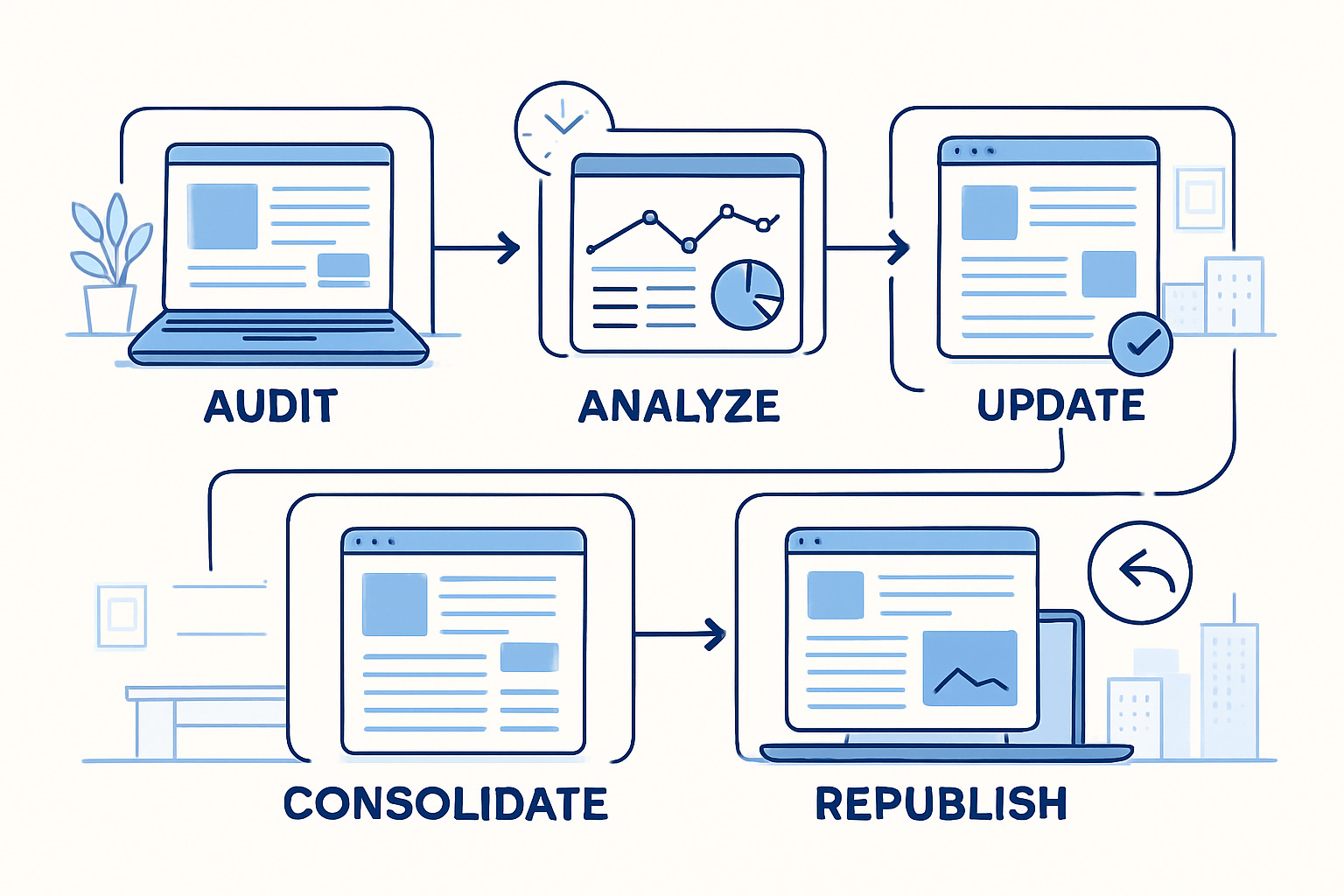
With your action plan mapped out, it's time for the fun part—actually making your content better. Focus on pages with the highest potential impact first, typically those with decent traffic but disappointing conversion rates.
Strengthen your E-E-A-T signals (Experience, Expertise, Authoritativeness, and Trustworthiness), which Google increasingly prioritizes for SaaS companies. Add detailed author bios, include customer testimonials, incorporate case study data, and link to authoritative sources. These signals tell both search engines and prospects that your content is credible and valuable.
Improve pages with multimedia elements to break up text-heavy content. Add relevant images, charts, videos, or interactive elements that support your message. Visual content improves engagement metrics and can help your pages rank for image search results, expanding your organic reach.
Improve internal linking strategically to create logical pathways between related content. Link from top-of-funnel blog posts to relevant case studies or feature pages. This approach helps distribute page authority across your site and guides prospects naturally through your buyer journey.
Optimize page speed using PageSpeed Insights to identify and fix performance issues. Compress images, minimize code, and consider content delivery networks for faster loading times. Page speed affects both search rankings and user experience—slow pages kill conversions.
Refresh publication dates for updated content to signal freshness to both search engines and readers. This simple change can improve click-through rates from search results because people prefer recent information, especially for topics that change frequently.
Test and optimize CTAs and forms systematically. Experiment with different call-to-action placements, wording, and designs. A/B testing often reveals significant conversion rate improvements with minimal changes—sometimes moving a CTA above the fold can double your conversion rate.
Step 7 – Turn this content audit for saas into an Editorial Roadmap
Don't let your audit become another forgotten spreadsheet buried in your Google Drive. The real value comes from changing your findings into an actionable editorial calendar that guides future content creation and optimization efforts.
Create a prioritization matrix by plotting potential projects on an impact versus effort grid. Quick wins (high impact, low effort) should be tackled first, followed by strategic projects (high impact, high effort). This visual approach helps you allocate resources effectively and maintain momentum.
Organize work into optimization sprints by breaking large projects into manageable two-week cycles. This approach maintains team momentum and allows you to measure results incrementally. It also prevents the overwhelming feeling that comes with massive, months-long optimization projects.
Establish regular review cycles with quarterly mini-audits to track progress and identify new opportunities. Set up automated alerts for significant traffic or ranking changes that might indicate when content needs updates. Your content landscape changes constantly, so your optimization efforts should be ongoing.
Implement content governance processes to keep everything current moving forward. This might include quarterly reviews of feature pages when you release product updates, annual refreshes of evergreen blog posts, or automated alerts when product changes affect existing content. The goal is to prevent future content decay before it happens.
The most successful SaaS companies treat content auditing as an ongoing discipline, not a one-time project. Your content audit for saas should become the foundation for smarter content decisions, better resource allocation, and ultimately, more revenue from your existing content investments.
Metrics, Tools & Dashboards to Track
Measuring the success of your content audit for saas requires tracking both leading indicators (traffic, rankings) and lagging indicators (conversions, revenue). Set up comprehensive tracking before implementing changes so you can accurately measure impact.
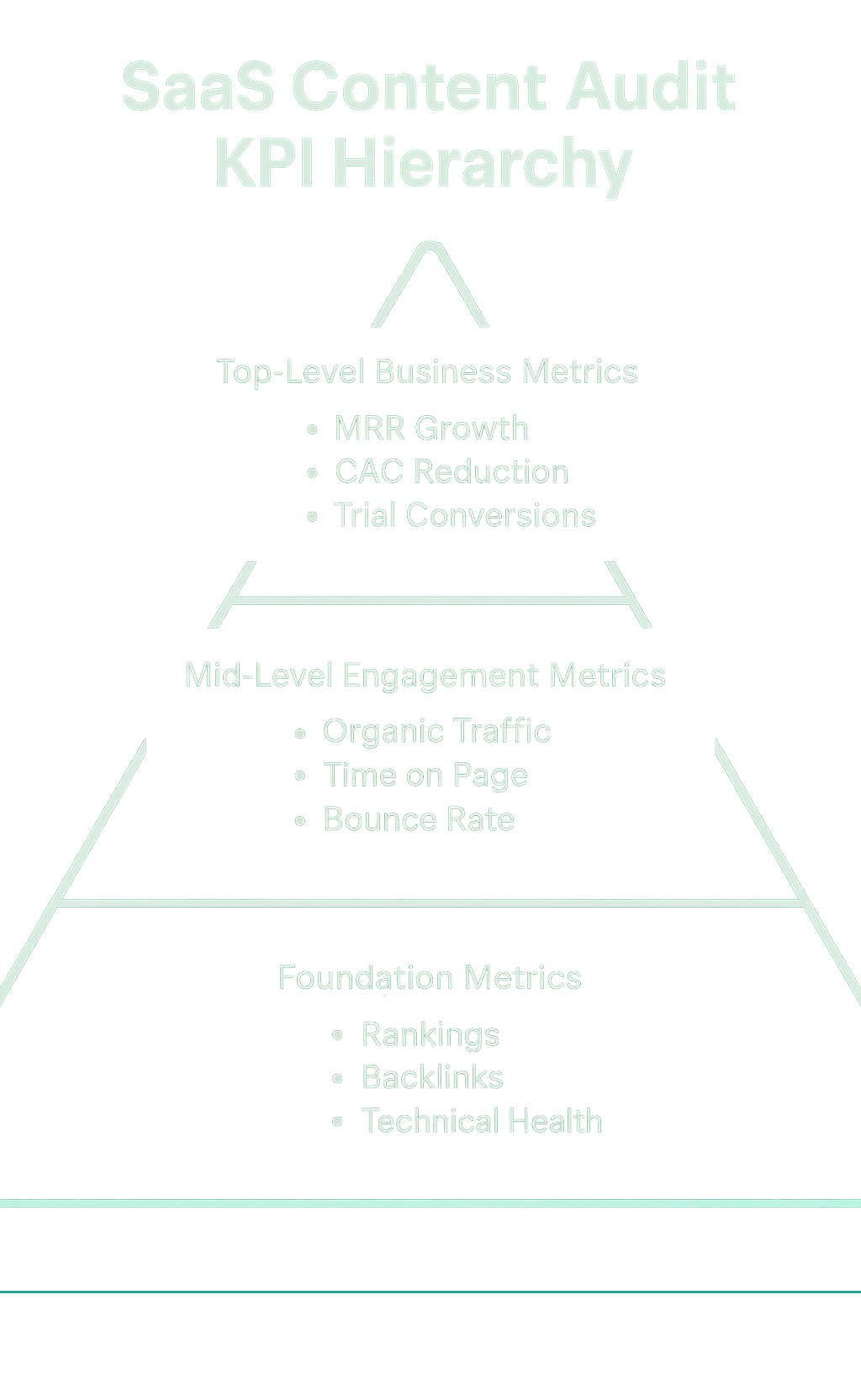
Essential KPIs for SaaS Content
Trial Sign-ups by Content Source: Track which blog posts, landing pages, and resources drive the most trial conversions. This reveals your highest-value content and informs future optimization priorities.
MQL to SQL Progression: Measure how content consumption influences lead qualification. Pages that help move marketing-qualified leads to sales-qualified leads deserve optimization investment.
Feature Adoption Metrics: For SaaS companies, content success isn't just about acquisition—it's about helping customers succeed with your product. Track how documentation and tutorial content correlate with feature adoption rates.
Churn-Influenced Content: Identify content that existing customers consume before churning. This might reveal knowledge gaps or product understanding issues that content can address.
Assisted Conversions: Utilize Google Analytics' attribution modeling to understand how various content pieces collaborate to drive conversions. Blog posts may not directly convert, but they often support the conversion process.
Organic Click-Through Rates: Monitor how changes to title tags and meta descriptions affect click-through rates from search results. Small improvements here can significantly increase traffic without improving rankings.
Recommended Tool Stack
Google Analytics 4: Essential for traffic analysis, conversion tracking, and understanding user behavior. Set up custom events to track content-specific actions, such as PDF downloads or video plays.
Google Search Console: Provides keyword ranking data, click-through rates, and technical SEO insights directly from Google. Use the Performance report to identify opportunities for optimization.
Mixpanel or Similar: For SaaS companies, product analytics tools help connect content consumption to in-app behavior and feature adoption.
Semrush or Ahrefs: Comprehensive SEO tools for keyword research, competitor analysis, and backlink monitoring. Both offer content audit features and keyword gap analysis.
Screaming Frog: Website crawler for technical SEO analysis. Identifies broken links, duplicate content, and metadata issues across your entire site.
URL Profiler: Combines data from multiple sources (analytics, social signals, backlinks) into a single spreadsheet for comprehensive content analysis.
For detailed guidance on implementing these tools effectively, see our Content Audit Best Practices guide.
Common Pitfalls, Prioritization & Continuous Improvement
Let's be honest, even the best-intentioned content audit for SaaS brands can go sideways fast. We've watched teams spend months auditing content only to see zero results because they made a few critical mistakes. The good news? These pitfalls are entirely avoidable once you know what to look out for.
The biggest mistake we see is what we call "boiling the ocean syndrome." Teams try to audit everything at once—every blog post, every landing page, every piece of documentation—and end up overwhelmed and paralyzed. Instead of making progress, they get stuck in analysis mode for months.
Another common trap is focusing on vanity traffic metrics while ignoring what actually drives revenue. That blog post about industry trends gets tons of traffic, but if it's not converting visitors into trial users or qualified leads, it might not deserve your optimization attention.
Many SaaS companies also make the mistake of treating their documentation and help content as separate from their marketing content audit. But here's the thing—your onboarding guides and feature explanations directly impact customer success and churn rates. They absolutely belong in your audit process.
The most painful mistake? Working in silos. When marketing teams audit content without input from sales, customer success, or product teams, they miss crucial insights into what prospects actually ask about and where customers encounter difficulties.
Prioritization Framework
Intelligent prioritization turns your audit findings into actual results. The secret is balancing quick wins with strategic improvements that take longer but deliver a bigger impact.
Start with an impact versus effort analysis. High-traffic pages with conversion issues often yield the most significant return on investment. A small improvement to a page that receives 10,000 monthly visitors will consistently outperform a significant overhaul of a page that receives only 100 visitors.
The traffic-conversion overlay approach works particularly well for SaaS companies. Look for pages that rank well and get decent traffic but have terrible conversion rates. These are goldmines waiting to be optimized. Maybe the CTA is buried at the bottom, or the page doesn't clearly explain your value proposition.
| Project Type | Effort Level | Impact Potential | Timeline | Example |
|---|---|---|---|---|
| Quick Wins | Low | Medium-High | 1-2 weeks | Fix broken links, update meta descriptions |
| Strategic Updates | Medium | High | 1-2 months | Consolidate related posts, major content refresh |
| New Content | High | Medium | 2-3 months | Fill identified content gaps |
| Technical Fixes | Variable | High | Variable | Site speed optimization, mobile improvements |
Don't forget to consider your buyer journey coverage when prioritizing. If you have tons of top-of-funnel content but nothing that helps prospects compare solutions or understand implementation, those bottom-funnel gaps should jump to the top of your list.
Avoidable "Don'ts"
Here are the mistakes that can actually hurt your SEO and conversion performance if you're not careful.
Never delete pages that are ranking well, even if they seem outdated. We've seen teams accidentally torpedo their organic traffic by removing pages that ranked in the top 10 for valuable keywords. If a page ranks well but feels stale, update it instead of deleting it. The ranking history and backlinks are valuable assets you don't want to lose.
Always set up proper 301 redirects when consolidating or removing pages. Skipping this step is like throwing away free SEO juice. Those inbound links and page authority don't just disappear—redirect them to the most relevant existing page to preserve that value.
Don't ignore tone and messaging consistency as you update content. Nothing confuses prospects faster than wildly different brand voices across your website. If your homepage sounds corporate and formal but your blog posts are casual and funny, that disconnect hurts trust and credibility.
Remember to include customer feedback in your audit decisions. Your sales team is familiar with the objections that come up repeatedly. Your customer success team knows where users get confused during onboarding. This real-world insight is often more valuable than analytics data alone.
Most importantly, don't get caught up in traffic vanity metrics. A blog post that drives 50,000 visitors but zero trial sign-ups isn't nearly as valuable as one that drives 500 visitors and 20 demo requests. Always connect your content performance back to actual business results.
Building an Ongoing Audit Cadence
The most successful SaaS companies view content auditing as an ongoing process, rather than a one-time project. Here's how to build sustainable habits that keep your content performing at its best.
Quarterly pulse checks work well for most SaaS companies. These aren't full-scale audits—just focused reviews of your highest-impact pages. Check your top 20 blog posts and key landing pages for performance changes, outdated information, or new optimization opportunities.
Product launch-driven audits are particularly important for SaaS companies. Every time you release new features, enter new markets, or change your positioning, related content needs updates. Set up a process to automatically review and update relevant pages whenever your product evolves.
Real-time monitoring through KPI dashboards enables you to identify problems early. Set up alerts for significant drops in traffic, rankings, or conversion rates. When a previously high-performing page suddenly tanks, you want to know immediately so you can investigate and fix the issue.
Cross-team content reviews should happen at least quarterly. Bring together marketing, sales, customer success, and product teams to discuss content performance and identify areas for improvement. These sessions often reveal optimization opportunities that pure data analysis would miss.
The goal isn't perfection—it's continuous improvement. Even small, regular optimizations compound over time to deliver significant results. Companies that consistently audit and optimize their content always outperform those that create more content without optimizing what they already have.
Frequently Asked Questions about SaaS Content Audits
How often should a SaaS company run an audit?
We recommend comprehensive audits every 6-12 months, with quarterly pulse checks on your highest-performing content. However, the frequency depends on how quickly your product and market evolve. SaaS companies with rapid product development cycles might need more frequent audits to keep content current.
Product update cycles should also trigger content reviews. When you launch new features, deprecate old ones, or change pricing, related content needs immediate updates to prevent customer confusion.
Which content types should be included in the audit?
A comprehensive SaaS content audit should include:
- Blog posts and articles that drive organic traffic and educate prospects
- Landing pages for campaigns, features, and use cases
- Case studies and success stories that provide social proof
- Product documentation and tutorials that affect user onboarding
- Lead magnets like ebooks, templates, and webinars
- Feature and pricing pages that directly influence conversions
- About and team pages that build trust and authority
- Help center articles that reduce support tickets and improve user experience
Start with your highest-traffic and highest-converting content types, then expand to include supporting content in subsequent audits.
How do we measure the ROI of updates?
Establish baseline metrics before making changes, then track improvements over time. Key metrics include:
Direct Impact: Increased organic traffic, improved search rankings, and higher conversion rates on updated pages.
Assisted Impact: Utilize attribution modeling to measure the impact of updated content on conversions across your entire site. A blog post update might not directly increase conversions on that page, but could improve overall funnel performance.
Revenue Influence: Connect content performance to pipeline and closed deals. Many CRM systems can track which content prospects consumed before converting.
Efficiency Gains: Measure how content updates reduce customer acquisition costs or improve sales team efficiency by better qualifying leads.
Track these metrics for at least 90 days after implementing changes to account for search engine indexing delays and user behavior patterns.
Conclusion
Here's the truth about content audit for saas companies: you're probably sitting on a goldmine of underperforming content that could be driving significantly more revenue with the right optimizations. Most SaaS content libraries contain enormous untapped potential in what you've already created.
The seven-step framework we've walked through isn't just theory. It's a battle-tested process that consistently helps SaaS companies squeeze more value from their existing content before investing time and budget into creating new pieces. Smart optimization often delivers faster results than constant content creation.
Think about it this way: you've already done the hard work of researching topics, writing content, and building domain authority. Now it's time to make that investment pay dividends. A systematic audit reveals which pieces are one optimization away from ranking higher, converting better, or driving more qualified demos.
However, what separates successful SaaS companies from the rest is that they don't treat content auditing as a one-and-done project. Your product evolves, your market changes, and your content needs to keep pace. The companies that build regular audit cycles into their marketing operations create a sustainable competitive advantage over time.
We've seen this play out repeatedly with the B2B companies we work with. The ones that consistently evaluate and optimize their content libraries build stronger brand trust, generate higher-quality leads, and create more efficient marketing funnels. In a crowded SaaS marketplace, these advantages compound quarter after quarter.
Content auditing is really about being a good steward of your marketing investment. Every blog post, landing page, and case study represents a significant investment of time, effort, and budget. Ensuring those assets perform at their peak potential is simply smart business.
Ready to uncover the hidden opportunities in your content library? Our Content Inventory Audit Checklist will guide you through the process step-by-step, helping you systematically evaluate and optimize your existing content.
Your content is already working for your business. Now it's time to make it work a whole lot harder.