

Maximizing Your HubSpot Lead Generation Machine
HubSpot landing page optimization is the process of improving your standalone conversion pages to generate more leads and drive higher conversion rates. Here's what you need to know:
- Remove navigation to keep visitors focused on your offer
- Lead with benefit-driven headlines that clearly state the value
- Position forms above the fold and only ask for essential information
- Prioritize mobile responsiveness—over half of visitors come from mobile devices; 62.54% of global visits were from mobile (excluding tablets) as of Q4 2024
- Test one change at a time to pinpoint what improves conversions
- Boost page speed—even a 1-second delay can cost you 7% in conversions
Landing pages are the workhorses of your B2B marketing strategy. Unlike regular website pages that offer navigation and multiple paths, HubSpot landing pages focus visitors on a single action: converting.
Whether you're launching a new campaign or revamping existing pages, effective landing page optimization principles remain consistent: clarity, relevance, simplicity, and continuous improvement.
HubSpot Landing Page Optimization Fundamentals
Let's talk about what makes HubSpot landing page optimization tick—because these aren't just regular pages with a form slapped on them. They're purpose-built conversion machines that play by different rules.
Think of your website as a shopping mall with multiple stores and distractions, while a landing page is a boutique with one perfect item for sale. That focus is what makes landing pages so powerful for lead generation.
What Is a HubSpot Landing Page & How Is It Different?
A HubSpot landing page stands apart from your regular website pages in several important ways:
No navigation menus mean visitors have nowhere to wander off to—they're either converting or leaving. This distraction-free design creates a psychological funnel that guides visitors toward taking your desired action.
Everything on the page aligns perfectly with your offer, whether that's an ebook download, webinar registration, or consultation request. There's beauty in this singular focus – when you try to accomplish multiple goals on one page, you typically accomplish none.
As Mole Street puts it, "While Google Analytics classifies a landing page as the first page a user lands on when entering your website, a true landing page is a standalone online destination designed specifically for conversion."
Essential Elements at a Glance
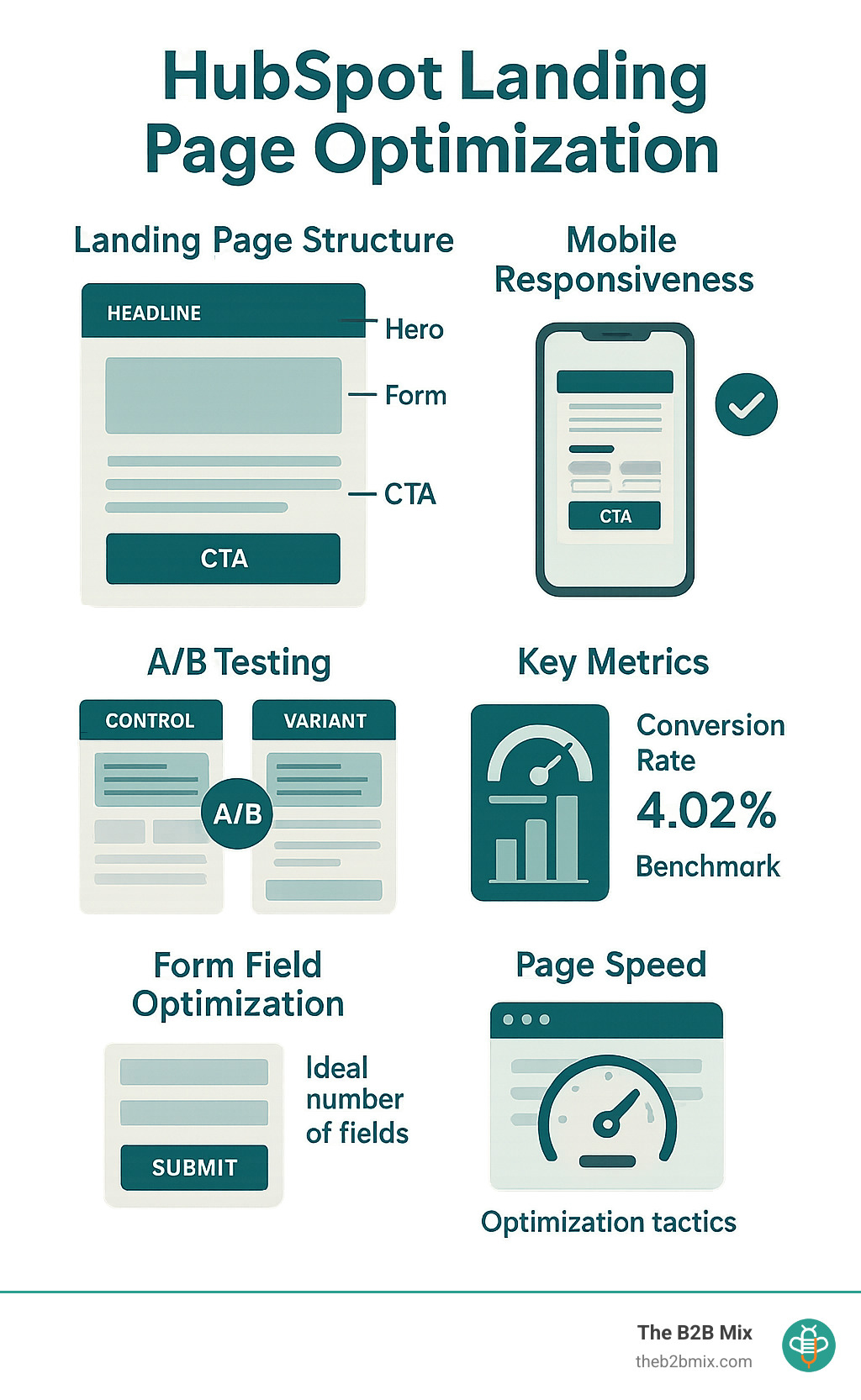
Every high-converting HubSpot landing page contains these critical ingredients:
- Benefit-focused headline that immediately communicates value
- Supporting hero image that visually represents the offer
- Concise copy addressing pain points and solutions
- Lead capture form positioned prominently (usually above the fold)
- Compelling CTA button with action-oriented text
- Trust signals like testimonials, security badges, or social proof
- Thank-you page that delivers on the promise
Why Optimization Matters for Revenue
Let's get down to the dollars and cents of why optimization isn't just a nice-to-have—it's essential:
At The B2B Mix®, we've seen how seemingly minor adjustments to landing pages can dramatically increase both lead quality and quantity. The secret sauce? Approaching optimization as an ongoing journey rather than a one-and-done task. Your landing pages should evolve as you learn more about what resonates with your audience.

Design, Copy & Forms That Convert
Creating landing pages that actually convert isn't just about looking pretty—it's about strategic design choices that guide your visitor toward taking action. Let's explore what really works regarding the visual elements, messaging, and data collection on your HubSpot landing pages.
Crafting Compelling Headlines & Body Copy
Your headline is make-or-break territory. With just 3 seconds to grab attention, you need to hit visitors with value immediately.
Most visitors scan pages in an F-pattern (across the top, down a bit, across again), so structure your content accordingly. Break up dense paragraphs with bullet points highlighting key benefits, and use power verbs that inspire action—words like "find," "transform," or "boost" create momentum.
The best landing page copy answers a straightforward question: "How will this make my life better?" Be specific about outcomes rather than making vague claims. And don't forget to address potential objections before they become roadblocks to conversion.
Call-to-Action Best Practices
Your CTA button deserves special attention—it's where the magic happens! Make it impossible to miss by using contrasting colors that pop against your page background. Give it breathing room with plenty of negative space around it.
Smart designers use directional cues like arrows or images of people looking toward the CTA to subtly guide visitor attention. And please, please don't use "Submit" on your button! Action-oriented text like "Get Your Free Template" performs much better.
Form Strategy & Data Collection
Forms are where many potential conversions go to die. Finding the right balance is crucial—asking for too much information may cause people to abandon their ships.
To create forms people actually complete, keep fields minimal—only ask what you absolutely need right now. Fortunately, HubSpot allows you to use progressive profiling to gather additional information over time, making each interaction feel less demanding.
Also, don't forget the power of hidden fields to quietly pass UTM parameters and tracking data without adding visual clutter. And always include GDPR-compliant checkboxes where needed—respecting privacy builds trust.
Pro tip: Use HubSpot's Smart Fields feature to automatically hide fields that returning visitors have already completed. This makes your form appear shorter to people who've engaged with you before, reducing friction and increasing the chances they'll complete it.
Mobile, Speed & Technical Performance
Let's face it—your gorgeous HubSpot landing page won't convert anyone if it loads at a snail's pace on mobile. According to Statista 2024, 62.54% of web traffic comes from mobile devices, so optimizing for smartphones isn't just nice to have—it's absolutely essential.
Think about your own behavior online. How long do you wait for a page to load before giving up? Probably not very long!
Quick Wins for Load Time
The good news is that HubSpot landing page optimization for speed doesn't require a computer science degree. Here are some practical ways to make your pages lightning-fast:
Compress those images before uploading them using tools like Tinify.
Enable lazy loading for below-the-fold images so they only load when visitors scroll down. This simple tweak can dramatically improve initial page load times.
Be ruthless with tracking scripts. Obviously, data is terrific, but do you really need all seventeen tracking pixels firing at once? Probably not.
Preload critical assets like your hero image so visitors see something immediately rather than watching a blank page slowly populate.
Leverage HubSpot's built-in CDN (Content Delivery Network) for faster global delivery of your content, regardless of where your visitors are located. Bonus: It's built in!
When prioritizing what to optimize, this handy reference can help:
| Element | Desktop Priority | Mobile Priority |
|---|---|---|
| Hero image | High | High |
| Above-fold content | High | High |
| Form | High | High |
| Social proof | Medium | Low |
| Video | Medium | Low (consider removing) |
| Animations | Low | Very Low |
Accessibility & UX Tweaks
Making your landing pages accessible isn't just the right thing to do—it expands your potential audience and often improves conversion rates.
Add descriptive alt text to all images so screen readers can properly describe your content to visually impaired visitors. Instead of "graph.jpg," try "Graph showing 55% conversion increase after landing page optimization."
Ensure your color contrast meets WCAG guidelines (4.5:1 for normal text). That light gray text on a white background might look sleek, but if people can't read it, they can't convert!
Use CSS aspect-ratio to prevent Cumulative Layout Shift (CLS)—that annoying jump that happens when elements load at different speeds, causing visitors to accidentally click the wrong thing. Google now penalizes pages with poor CLS scores, so this matters for SEO too.
Test with keyboard navigation to ensure form accessibility for visitors who can't use a mouse.
HubSpot's editor makes mobile optimization surprisingly straightforward:
- Click on the module you want to edit
- Go to the Styles tab, then click the mobile phone icon
- Add or adjust padding to ensure text and elements fit the mobile screen
- Use the preview option to check and refine your mobile layout
👉🏻 Scientific research on cumulative layout shift
Testing, Analytics & SEO for Continuous Growth
Let's be honest—the real magic happens after your landing page goes live. That's when you roll up your sleeves and start fine-tuning based on actual visitor behavior. Basically, you need to consider your landing page a living experiment that gets smarter with every test.
Setting Up A/B Tests in HubSpot
A/B testing (or split testing) is like having a friendly competition between two versions of your page. And HubSpot makes it surprisingly simple:
- Steer to Marketing > Landing Pages
- Select your page and click "Create A/B test"
- Make just one change to create your variant (maybe a new headline or button color)
- Choose your success metric (usually submission rate)
- Launch and let HubSpot gather data until you reach 95% statistical confidence
The golden rule of A/B testing is changing just one element at a time.
What I love about HubSpot's testing tool is the "auto-winner" feature—once a clear winner emerges, HubSpot can automatically direct more traffic to that version. Smart, right?
Metrics That Matter
Not all metrics deserve equal attention. Here are the ones worth tracking closely:
Page visits tell you about traffic volume, while traffic sources reveal which channels work hardest. Your submission rate (the percentage of visitors completing your form) is the north star metric for most landing pages.
Pay attention to bounce rate to spot potential issues with page relevance, and use form abandonment data to identify where people get stuck. Additionally, pay attention to Interaction Next Paint (INP) to see how quickly visitors can engage with your page.
And of course, there's Return on Investment (ROI) – the ultimate measure of success that connects your landing page efforts to actual business results.
HubSpot's reporting tools let you schedule these metrics to land in stakeholders' inboxes automatically – a small touch that makes you look incredibly organized (and saves you from manually pulling reports every week).
Landing Page SEO Checklist
While conversion is the primary goal, why not get some organic traffic benefits too? Here's how to make your landing pages more findable:
When you start, create a keyword-optimized page title under 60 characters. Next, structure your landing page URL with relevant keywords (like /ebooks/landing-page-optimization-guide/). Craft a compelling meta description that encourages clicks from search results.
For consistency, make sure your H1 tag matches your page title. Optimize images with descriptive file names and alt text (bonus: this helps with accessibility too). Implement schema markup to qualify for rich snippets in search results.
Remember to build internal links to your landing page where relevant on your site. And here's my favorite overlooked tactic: offer an embed code with a backlink to encourage other sites to link to your landing page—free link building!
👉🏻 More info about HubSpot Content Optimization System
Frequently Asked Questions about HubSpot Landing Page Optimization
How many form fields should my HubSpot landing page use?
Form fields are the gateway to your leads—too many and you'll scare visitors away, too few and you miss valuable information. The sweet spot? It depends on what you're offering.
Aim for three to four form fields to maximize conversions for top-of-funnel offers like ebooks or guides. Industry data shows that landing page forms with four fields often see the best results, balancing lead quality and completion rates. Some marketers prefer just name and email for simplicity, but adding one or two more fields can help qualify leads without hurting your conversion rate.
When dealing with bottom-of-funnel offers—demos, consultations, or other high-intent requests—you've earned the right to ask for a bit more. Prospects who want these resources are more invested, so five to seven fields won't scare them off.
Here's a pro tip: HubSpot's progressive profiling is your secret weapon. Instead of bombarding visitors with a lengthy form upfront, collect additional information gradually over multiple conversions. Your prospects will thank you for respecting their time!
What metrics define a "good" conversion rate in B2B?
For B2B specifically, a "good" conversion rate typically ranges between 2.5% and 5% for top-of-funnel offers and dips to 1% to 3% for bottom-of-funnel requests (which makes sense, as these represent bigger commitments).
But here's the thing about benchmarks—they're interesting, but not always helpful. A more meaningful approach is to improve your conversion rates over time. Think quality over quantity: A page converting at 2% but generating highly qualified leads that close deals is infinitely more valuable than one converting at 5% with tire-kickers who never buy. Your sales team will certainly agree!
Can I optimize for mobile without custom code in HubSpot?
Absolutely, yes! One of HubSpot's beauties is that it makes mobile optimization accessible without requiring you to dive into code (unless you want to).
The drag-and-drop editor includes everything you need to create mobile-friendly landing pages. Here's how to fine-tune your mobile experience:
- While in the landing page editor, click on any module you want to adjust
- Steer to the Styles tab and click the mobile phone icon
- From here, you can tweak padding, adjust font sizes, and resize images precisely for mobile devices
- Use the preview option frequently to check how your changes look on different screen sizes
While HubSpot does offer custom CSS functionality for code-savvy users, most mobile optimizations can be handled right within the standard editor. This means you can create responsive, conversion-friendly pages without hunting down a developer—music to most marketers' ears!
With nearly 63% of web traffic coming from mobile devices, these optimizations aren't just nice-to-haves—they're essential for HubSpot landing page optimization success.
Conclusion
HubSpot landing page optimization isn't something you check off your to-do list and forget about. It's more like tending a garden—regular care and attention yield the best results over time. The most successful B2B companies we work with approach their landing pages with curiosity and openness, always looking for ways to improve based on what the data tells them.
After helping dozens of companies transform their landing pages from "meh" to "magnificent," we've found these principles make all the difference:
Focus on a single offer per page. When you try to accomplish multiple goals on one landing page, you achieve none. Your visitors should never wonder, "What should I do here?"
Keep it simple, especially on mobile. With nearly 63% of web traffic coming from smartphones, your landing page must look fantastic and function flawlessly on small screens. That extra padding adjustment in the mobile editor? It matters more than you think!
Test methodically, not randomly. Change one element at a time—your headline, form placement, or button color—so you know exactly what moved the needle on conversions.
Let the numbers guide you. Set up proper tracking in HubSpot and pay attention to what those metrics tell you. Sometimes, the data will surprise you (in a good way).
Balance user experience with SEO fundamentals. Your page should be a delight to use while still being findable by search engines.
We're Here to Help
At The B2B Mix, we take the mystery out of landing page optimization. We roll up our sleeves and work alongside your team to create pages that look professional and convert visitors into qualified leads. No marketing jargon, no empty promises—just practical expertise and a commitment to delivering real results.
Whether you're just getting started with HubSpot or looking to squeeze more performance from your existing landing pages, our strategies will help you build a lead generation machine that works while you sleep.
Ready to transform your landing pages from static brochures into powerful conversion tools? We'd love to help.
>>> More info about HubSpot Services