

Why Building Workflows is Critical for B2B Success
Learning how to build workflows effectively can transform your B2B marketing operations from chaotic manual processes into streamlined, automated systems. Here's the essential process:
Quick Answer:
- Identify the repetitive process you want to automate
- Map the workflow visually using standard symbols
- Build using workflow automation software or templates
- Test thoroughly with sample data before going live
- Monitor and optimize based on performance data
If you're drowning in repetitive tasks, chasing approvals, or watching leads slip through cracks in your processes, you're not alone. Many knowledge workers spend significant time on "work about work" - hunting for information, chasing updates, and managing manual handoffs.
Workflows aren't just about saving time - they're about creating consistency, reducing human error, and ensuring nothing falls between the cracks. When done right, they transform how your team operates and how customers experience your brand.
Whether you're looking to automate lead nurturing, streamline content approval, or create seamless customer onboarding, the principles remain the same. The key is starting with the right foundation and building systematically.
The What & Why: Understanding Workflow Fundamentals
A workflow is an end-to-end system that moves information and tasks between people and tools automatically. It differs from a task (one piece of work) and a process (a series of tasks) because it adds coordination, timing, and rules.
For B2B teams, workflows are essential. They drive consistency in the customer journey, eliminate manual errors, and free up your team for higher-value work.

The Core Components
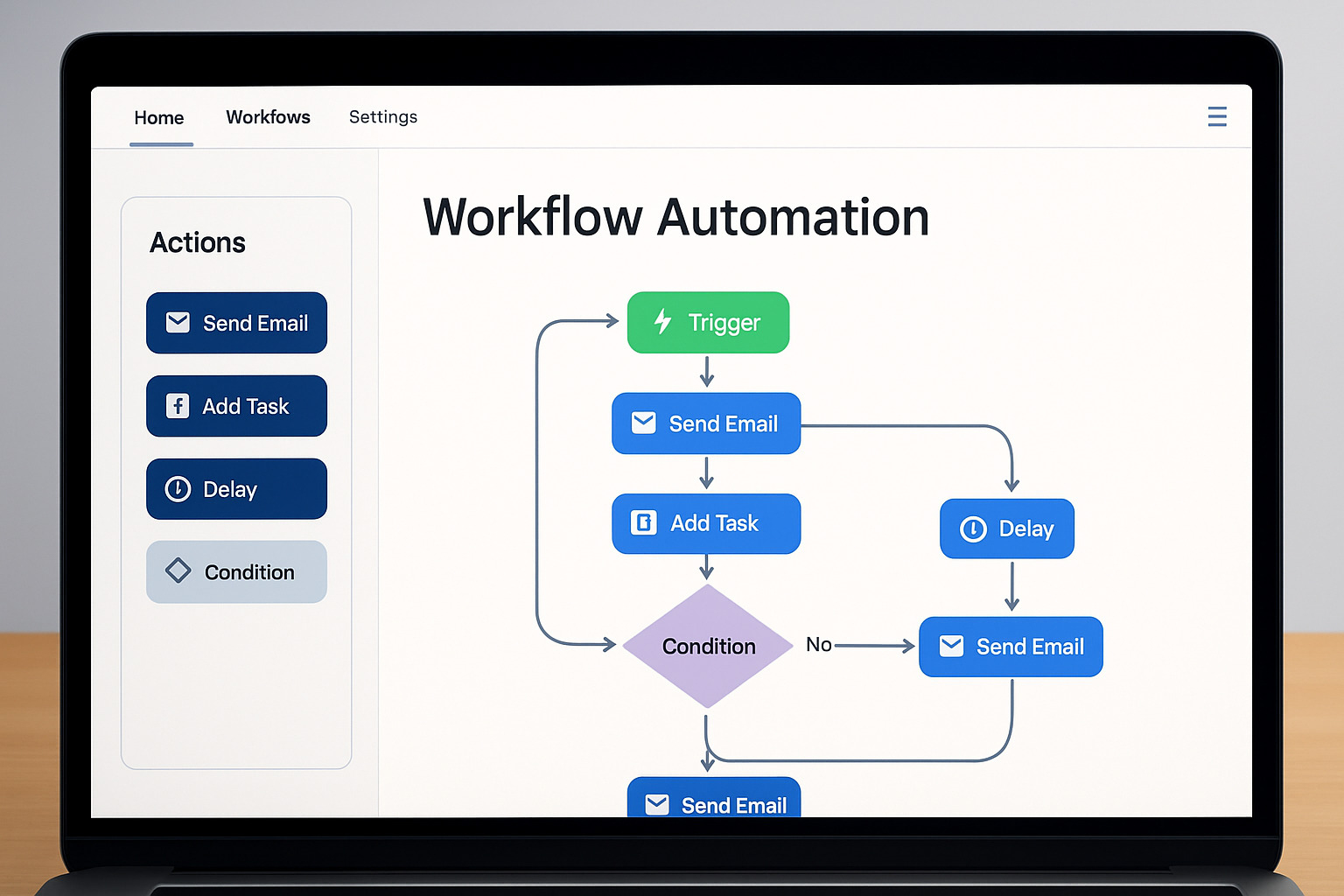
- Triggers – when the workflow starts.
- Actions – what the workflow does (send email, create task, update record).
- Conditions – if/then logic that personalizes the path.
- Delays – timing between actions.
- Enrollment criteria – guardrails that decide who can enter.
Types of Workflow Models (Quick View)
- Sequential – straight-line steps (great for onboarding).
- State-machine – contacts move between states based on behavior.
- Rules-driven – complex logic (e.g., lead scoring).
Common B2B uses include lead nurturing, client onboarding, content approval, and customer feedback collection.
The Blueprint: How to Design and Map Your Workflow
Design first, automate second. A little planning saves a lot of re-work.
Start with a process audit to spot repetitive, time-eating, or error-prone activities. Collaborate with the people who actually do the work, then set SMART goals (e.g., "Cut lead response time from 4 h to 30 min in 30 days").
Step 1 – Identify and Define
- Look for high-frequency or high-risk processes.
- Pick one clear start point and one clear finish line.
- Begin with a straightforward use-case to win confidence.
Step 2 – Map Visually
Grab a whiteboard or a tool like LucidChart.
- Ovals – start/end
- Rectangles – actions
- Diamonds – decisions
- Arrows – flow
Every diagram must show Input → Change → Output. This becomes your build blueprint.
Let's Get Building: A Step-by-Step Guide
Modern no-code platforms make building surprisingly simple—think digital LEGO bricks.
Build from Scratch (High-Level)
- Choose the object – contact, deal, ticket, etc.
- Set enrollment triggers – form submission, property change, list membership, or manual add.
- Add actions – send email, create task, update property, notify rep.
- Layer conditional logic – if/then branches personalize the journey.
- Add thoughtful delays – pace communication so it feels human.
Use Pre-Built Templates
Most tools ship with libraries of ready-to-go workflows. Select a template close to your goal, then tweak:
- Update your content to your brand voice.
- Adjust timing to your sales cycle.
- Insert your own conditions and business rules.
Templates = faster launch + baked-in best practices. Our HubSpot Services team customizes them for clients all the time.
The Launch Sequence: Test, Implement, Optimize
A workflow isn’t finished when it looks good in the builder—it’s finished when it performs in the wild.
Step 3 – Relentless Testing
- Create sample records that mirror real-world edge cases.
- Run through multiple scenarios (happy path and "weird" path).
- Check every email, task, property update, and delay.
Step 4 – Implement & Train
- Soft-launch to a small group first.
- Keep training concise (≈ 30 min) and practical.
- Provide clear documentation and a support contact.
Step 5 – Monitor & Iterate
Track KPIs such as completion time, conversion rate, and error rate. Review regularly and make small, data-driven tweaks. Workflows should evolve with your business.
Common Workflow Pitfalls and How to Sidestep Them
We've all been there: Staring at a workflow that seemed brilliant in theory but turned into a nightmare in practice. After helping countless B2B companies build workflows that actually work, we've seen the same mistakes pop up again and again. The good news? They're all completely avoidable.
Making Things Overly Complex
Overcomplicating the process is hands down the biggest trap we see teams fall into. After all, there's something seductive about building elaborate workflows with dozens of branches and conditions. But here's the reality: Complex workflows are harder to test, impossible to troubleshoot, and a maintenance nightmare down the road.
Keep it simple, especially when you're starting out. A workflow that does three things well is infinitely better than one that tries to do thirty things poorly. You can always add complexity later once you've proven the basic concept works.
Ignoring Stakeholders
Ignoring stakeholder feedback is another classic mistake. We've seen workflows that look neat on paper but miss entirely how people actually work. The sales rep who has to follow up on those automated tasks? Who needs to update those contact properties? They know things that spreadsheets and flowcharts don't capture.
Involve the people who will actually use the workflow in both the design and testing phases. Their insights will save you from building something that technically works but practically fails.
Little or No Testing
Insufficient testing is where good intentions meet harsh reality. We've witnessed workflows that send dozens of duplicate emails, create tasks for people who left the company months ago, or simply refuse to trigger at all. Obviously, these aren't minor hiccups: They're credibility-damaging disasters that could have been caught with proper testing.
Don't just test the happy path where everything goes perfectly. Test what happens when someone fills out your form twice, when a contact meets multiple enrollment criteria, or when your CRM data is messy. Real-world testing reveals real-world problems.
Poor Documentation
Poor documentation might seem like a minor issue, but it becomes a major headache six months later. Future you (and your teammates) will thank you for explaining why that complex conditional logic exists and what business problem it solves.
Document not just what your workflow does, but why you built it that way. Include the business reasoning behind your decisions, not just the technical implementation.
Setting and Forgetting
The "set it and forget it" mentality is perhaps the most dangerous pitfall of all. Workflows that worked perfectly last quarter might be completely wrong for this quarter's business needs. Customer behaviors change, team structures evolve, and business priorities shift.
Schedule regular workflow reviews just like you would any other important business process. Are your workflows still solving the right problems? Are they creating new problems you didn't anticipate?
Before finalizing any workflow, ask yourself these three key questions:
- Does this workflow solve a real problem that impacts our business goals?
- Is the workflow simple enough that a new team member could understand it?
- Have we tested this workflow with real data and scenarios?
If you can't answer "yes" to all three, it's time to step back and refine your approach. The goal isn't to build the most sophisticated workflow possible - it's to build one that actually makes your team's life easier and your business more efficient.
Frequently Asked Questions
Workflow vs. Business Process
A business process is the recipe (the steps) while a workflow is the automated sous-chef that follows the recipe, moving tasks, data, and notifications between people and tools.
How Do I Pick My First Workflow?
Start with something that is:
- Repetitive (daily or weekly)
- Time-consuming yet rule-based
- Prone to human error
- Directly tied to revenue, efficiency, or customer satisfaction
Examples: lead follow-up, new-customer onboarding, or internal approvals.
Can a Workflow Be Too Simple or Too Complex?
Yes. One-step workflows rarely justify maintenance. Over-engineered monsters break easily. Aim for the middle ground—enough steps to solve a real problem, but simple enough to explain in under five minutes.
Conclusion: Start Building Smarter Processes Today
How to build workflows isn't just a technical skill. In fact, workflow skills are a strategic superpower that can completely transform how your B2B organization operates. Think about it: every minute your team spends on repetitive tasks is a minute they're not spending on the creative, strategic work that actually moves the needle.
Here's what makes this whole process so empowering: you don't need to be a technical wizard to create workflows that drive real results. The tools have become incredibly user-friendly, and the principles we've covered work whether you're automating something simple, like lead follow-up emails, or something complex, like multi-stage customer onboarding.
Workflows are inherently iterative. Although you may like to see perfection out of the gate, likely, your first workflow version won't be perfect, and that's completely okay. The goal is progress, not perfection. Firstly, start simple, test thoroughly, and improve continuously. Then, each workflow version you build teaches you something new about your processes and your business.
The benefits stack up quickly: increased productivity, fewer errors, happier customers, and lower operational costs. But the real magic happens when your team realizes they can focus on strategy instead of scrambling to keep up with manual tasks. That's when workflows stop being just a productivity tool and become a competitive advantage.
Whether you're looking to nurture leads more effectively, onboard customers seamlessly, or simply stop chasing down approvals, the principles remain the same. Every successful workflow starts with understanding what you're trying to achieve and ends with continuous improvement based on real performance data.
Need Help with Your Sales & Marketing Workflows?
At The B2B Mix®, we've guided countless B2B companies through this exact process, and here's what we've learned: the companies that succeed aren't necessarily the ones with the most complex workflows. They're the ones that start with clear goals, build systematically, and keep iterating based on what actually works.
Don't let the scope of possibilities overwhelm you. Pick one process that's causing friction for your team, and start there. Every expert was once a beginner, and every great workflow started with someone deciding that manual chaos wasn't good enough anymore.
Ready to turn your repetitive processes into automated efficiency? Get expert help with your Marketing Operations and start building workflows that actually work for your business.