
HubSpot Implementations & Migrations
Considering a switch to HubSpot?
However you got here, you're weighing the same question: Is HubSpot actually the right move for your business? Maybe your marketing automation is running but sales works off a separate list, and leads fall into the gap between them. Maybe you've been on Salesforce for years and the renewal has you reconsidering. Maybe you outgrew Pipedrive, came from Mailchimp or ActiveCampaign, or never had a real system at all.
We help established B2B companies work through that question, including telling you when staying where you are is the better answer.
- Schedule your call today
Sound familiar?
The pattern shows up across mid-market B2B companies every quarter.
Seven flavors of the same conversation. If you recognize yourself in any of these, you're in the right place.
Half a system
Marketing's capped by the tooling
Your CRM is fine. The problem is everything around it: email, landing pages, forms, lead scoring, attribution. You're either stitching point tools together or running marketing thin because the platform can't do what you need. You want one place where marketing actually runs, not just stores contacts.
Outgrown the tool
You outgrew the simpler tool.
Pipedrive worked at a 5-person sales team. It's not keeping up with 20 reps, multiple regions, and the marketing campaigns you're running now. You're hitting the ceiling of what the platform can do.
renewal pressure
You're on Salesforce, and it's not paying off.
The renewal is coming up. The total cost — license, admin, the consultant who built half of it — is more than the value you're getting back. You're paying for features your team doesn't actually use.
support split off
Your support team is on a separate system from sales.
Zendesk, Freshdesk, Intercom, or just an inbox. Customer context disappears when the conversation moves from sales to support. Your team is switching tabs to see what a customer's been doing across the company.
Site off platform
Your website is separate from your marketing automation platform.
WordPress, Wix, or a custom site that doesn't connect to your marketing and sales data. Personalization and attribution are harder than they should be.
No system
You don't have a system at all.
Spreadsheets. Inboxes. A few tools that don't talk to each other. It worked at $5M. It doesn't work now.
Inherited mess
You inherited a half-finished system.
New leadership came in. The previous setup is undocumented and nobody really uses it. You need to decide: fix it, replace it, or start over.
Any of those? Here's how we think about the question of whether HubSpot is the right answer.
Not ready to talk yet?
Try our HubSpot Migration Readiness Assessment
An 8 question self-assessment that helps you understand your company's readiness to migrate to HubSpot.
× Before

A stack that grew by accident.
Five tools that don't talk to each other. Three sources of truth. A "system" that's really just whoever happens to remember.
HubSpot,
done right →
✓ After
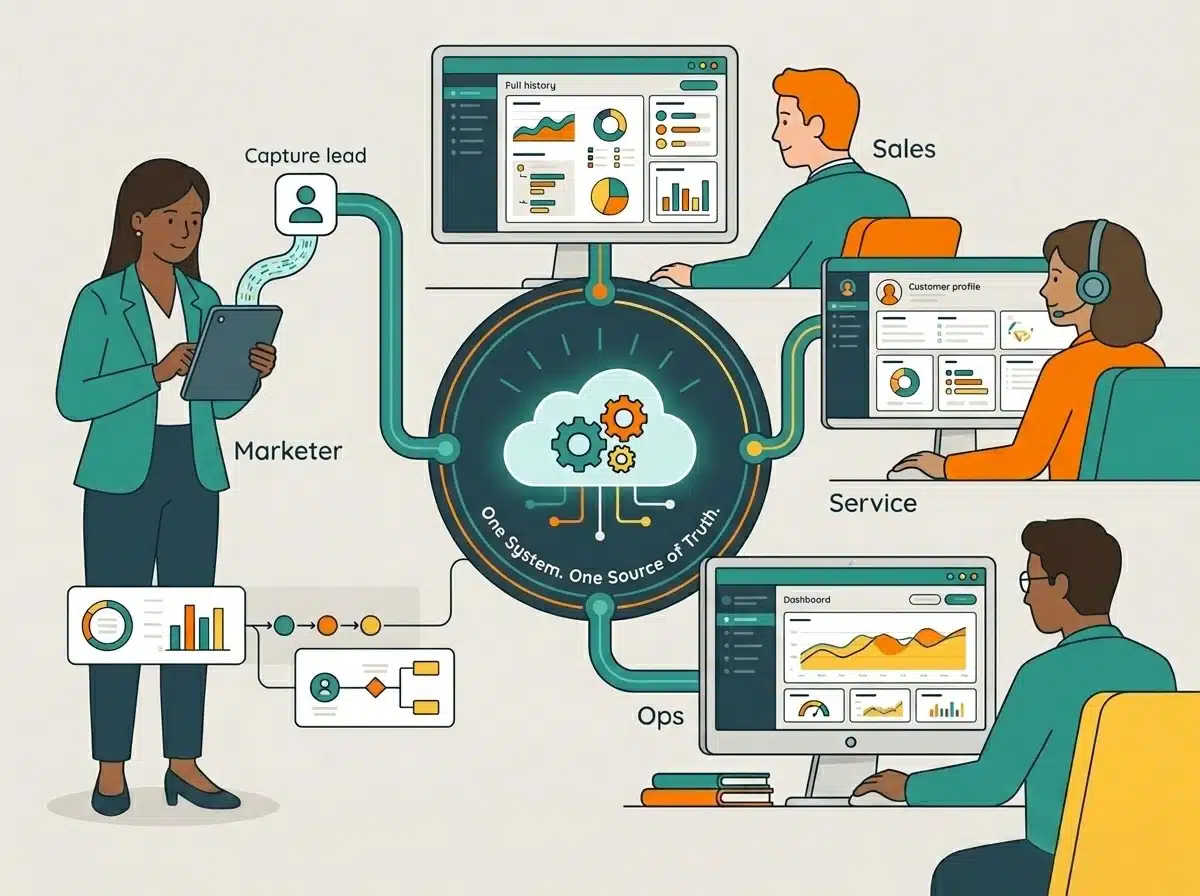
One system. One source of truth.
Marketing, sales, service, and ops on the same data. The lead a marketer captured shows up on a rep's screen with the full history.
- Schedule your call today
Why companies switch to HubSpot
What HubSpot does well.
It's one platform; not five.
Marketing, sales, service, content, and operations all run on the same data. The lead a marketer captured shows up on the rep's screen with the full history. The deal a rep closed shows up in the service team's queue with the full context. The reporting connects every step. That's not the case when you're stitching together separate tools.
Adoption is meaningfully easier than Salesforce.
Reps actually use it. That's the difference that compounds. A CRM nobody uses is just an expensive notebook. HubSpot's interface and workflows are designed for the user to spend less time logging things and more time selling.
You can finally see which marketing drove revenue.
Interactions with campaigns, emails, landing pages, and ads live on the same contact record that's associated with the deal they eventually create. You can trace a closed deal back to the campaign that started it instead of guessing. Marketing stops being the line item nobody can measure and starts showing its number next to sales.
Support sees the whole customer, not just the ticket.
When a customer emails support, the rep already knows what they bought, who closed the deal, and every conversation that came before. No asking the customer to repeat themselves, no switching tabs to piece the story together. The same record sales and marketing work from is the one support answers from.
Workflow automation doesn't require a developer.
Route a lead differently when company size hits a threshold. Trigger a sales email when a contract is about to lapse. Build it without filing a ticket. That removes a category of friction most growing B2B teams underestimate.
Reporting that actually loads on time.
Sounds basic. Isn't. The number of mid-market companies sitting on a CRM where leadership stopped asking for reports because they never showed up is real.
What people worry about.
It's expensive.
True. HubSpot at the Pro and Enterprise tiers is not cheap.
The way to evaluate the cost is the total cost of what you're replacing: license fees, consultant fees, the bandwidth your team spends maintaining systems that don't talk to each other. Most companies that switch end up spending less in total.
Not always. We'll do the math with you before you commit to anything.
What happens to our email and campaigns?
Fair worry. Switching marketing platforms means your sending reputation, your active automations, and your forms all have to come across without dropping a beat.
We warm up your sending domain in HubSpot before you push real volume, so deliverability doesn't crater the first week. Automations and forms get rebuilt and tested against the originals before they go live. Your current campaigns keep running until the HubSpot versions are verified.
My team will revolt
Possible. The team most likely to revolt is one that wasn't consulted, didn't get trained, and didn't see the system make their day easier in the first 30 days. That's a change management failure, not a HubSpot failure.
We've watched senior reps who were openly hostile to the migration become the platform's strongest advocates by month three. We've also watched teams quietly sabotage rollouts because nobody prepared them. The difference is usually in how the rollout was planned, not in the people.
What about all our data?
Legitimate concern. Data migration is where most HubSpot rollouts go sideways. The work is meticulous, not glamorous, and the agencies that breeze past it in their pitch are usually the ones who create problems on month four.
We document every object, every field, every relationship before the migration. We test the migration before we run it. We hold the old system live in parallel until the new one is verified.
What if HubSpot isn't actually better for us?
Sometimes it isn't. If you're a $200M enterprise with deep Salesforce customization, hundreds of users, and a Salesforce admin team in place, HubSpot may not be the right answer. We'll tell you that before you sign anything.
Our work is helping established B2B companies modernize systems that have outgrown them — not selling HubSpot to people who shouldn't switch.
- Schedule your call today
What to expect in an implementation or migration
How long the switch to HubSpot takes depends on what you're moving from.
Two typical paths. Most engagements look like one or the other.
The fast path
30–90 days
depending on how the work is split: We operate or your team does
For companies coming from spreadsheets, Mailchimp, Active Campaign, other simpler tools, or setting up their first real CRM. No entrenched system to untangle, no historical data weighing things down.
We operate it
30–45 days to full value · team using HubSpot within 2 weeks
Your team operates it
60–90 days from kickoff · adoption time folded into the timeline
Goal: speed to value. Your team logging into HubSpot and seeing immediate wins within two weeks — not waiting three months for a perfect rollout.
Week 1
Quick audit, core setup, contact import.
Set up core objects, lifecycle stages, and the workflows your team needs on day one. Configure your most important integrations (typically email and calendar).
Week 2
Your team starts using HubSpot for real work.
We're there for office hours, real-time training, and fast fixes as questions come up.
Weeks 3-6
Add the layers.
Reporting, lead routing, marketing automation, sales sequences. Each piece gets added as the team is ready for it. We keep iterating based on what's actually working.
End state: a HubSpot instance your team actually uses, built around how you really work — not how someone thought you might work in a 60-page requirements doc.
The full migration
90+ days
Years of data, deep customization, large user teams
For companies coming from Salesforce, Pipedrive at scale, Marketing Cloud (Pardot), or other established systems with built-out automations, integrations, and historical data.
More care. Less because HubSpot is hard, more because the system you have is doing more than you realize — and rushing the migration is how things get broken. We'll give you a real estimate after we see the system you're migrating from.
Days 1-30
Discovery and planning.
We don't touch your data. We audit every object, custom field, workflow, and integration. We interview the people who use the system. We document everything and build the migration plan with phases, dependencies, and rollback points. This phase looks boring. It's where most migrations are won or lost.
Days 31-60
Build and migrate.
Configure HubSpot to the plan. Migrate data in stages, testing on samples before running the full migration. Verify records, relationships, and history come over correctly. Your old system stays live in parallel. We train your team in small groups on the parts they actually use.
Days 61-90+
Launch and stabilize.
Phased go-live, often one team first. Both systems run in parallel for two to four weeks. We watch the data and adoption signals daily. Office hours during the launch window. The old system gets decommissioned only after the new one is verified.
End state: a verified rollout the team has stopped reflexively logging into the old system to use.
After the implementation is done, the next phase is ongoing support—most clients move into it directly. We cover that below.
What it costs
Real numbers, with the assumptions behind them.
We quote "switch to HubSpot" engagements based on estimated hours, because moving from spreadsheets to Sales Hub is meaningfully different from moving off three years of Salesforce automations. To give you a realistic sense:
Simple Implementation
$3,750–$6,000
total · 25–40 hours · 4–6 weeks
Fast-path engagements. Single hub, coming from spreadsheets or simpler tools, smaller team.
-
Core HubSpot objects, lifecycle stages, day-one workflows
-
Contact import + email/calendar integrations
-
Office hours during your team's first weeks live
Full Migration
$15,000–$30,000
total · 100+ hours · 90 days · higher for multi-hub
Established CRM with built-out automations, integrations, historical data, and a team that needs careful change management.
-
Full audit + documented migration plan with rollback points
-
Phased data migration, parallel-run, verified before cutover
-
Role-based training in small groups · phased team-by-team go-live
What's in the quote, what isn't.
If the price feels lower than other quotes you've gotten, that's because we're not bundling the platform license into the price.
You buy HubSpot directly. We bill for the work. Your actual quote depends on team size, system complexity, data scope, integrations, and ongoing support — and we'll tell you the assumptions so you can push back on anything that doesn't fit.
- Schedule your call today
What happens after launch
The migration is one chapter. Most clients stay 3–6 months.
The riskiest period for HubSpot adoption is the first two quarters: habits forming, edge cases surfacing, the team still figuring out what they want to track. Having us close at hand is what separates rollouts that stick from rollouts that quietly atrophy.
Hours Block
$750 / on demand
Fast fixes. Flexible support. Sold in 5-hour blocks.
- Use hours when you need them
- 2 - 3 day turnaround on routine tasks
- No monthly commitment*
Most Popular
Core Support
$2,500 / month
Your to-do list, done for you. Up to 15 hours/month.
- Email builds, form creation, workflow tweaks
- 2 - 3 day turnaround on routine tasks
- Minimum 3-month contract
Embedded Team
$8,000 / month
Your HubSpot, fully handled. Up to 40 hours/month.
- Outsourced HubSpot admin team
- Strategic + operational support
- Minimum 6-month commitment
No lock-in.
Move down a tier (or off retainer entirely) as your team gets stronger. Most clients reduce their retainer over time — that's a sign the system is working.
Proof
A few of the engagements that shaped how we work.
Featured Case Study
JB Warranties
Warranty services · $30M+ revenue · family-owned
Built out their full HubSpot stack across Marketing, Sales, Service, Operations, and Content Hubs. Founder transitioning to next-gen leadership. Their President describes the moment they realized their systems hadn't kept up with the company.
Case Study
Environmental services company
Anonymized · Sales Hub clean-up
Came to us with a messy Sales Hub, three years of accumulated workarounds, and a sales team that had stopped trusting their own data. We cleaned up the architecture, retired the workarounds, and rebuilt the reporting layer.
Case Study
KAM Technologies
Field service integration consultant
Built out Marketing and Sales Hubs. Just signed for Content Hub Pro this month to support their growing content operation. The kind of relationship that compounds.

We're certified in HubSpot's Solutions Partner Program at the Gold tier. That means we've met HubSpot's standards for both implementation expertise and ongoing customer success. It also means we're accountable to HubSpot, not just to you, which matters when something goes wrong and you want a partner who has skin in the game.
Not ready to talk yet?
Try our HubSpot Migration Readiness Assessment
An 8 question self-assessment that helps you understand your company's readiness to migrate to HubSpot.
Why work with us for your onboarding
Standard onboarding isn't built for established B2B.
HubSpot's standard onboarding is included with your license, plus a separate onboarding fee. For some companies, that's enough. For most established B2B companies switching from another platform—or setting up their first real system—it isn't. Here's what changes when you work with us.
Solutions partner benefit
HubSpot waives their onboarding fee when you work with a Solutions Partner.
HubSpot charges a standard onboarding fee on top of your license that varies by hub and tier. When a Solutions Partner like us is doing the implementation, HubSpot waives those fees—we're doing the work HubSpot's team would have done.
You're not paying twice. You're redirecting the budget from a generic onboarding to a partner who works specifically with businesses like yours.
HubSpot also offers Customer Platform packages that bundle multiple hubs together. Those carry their own onboarding fees, and waiver terms depend on the specific package. We'll walk through the math with you on the discovery call.
Standard HubSpot onboarding fees
Waived with a Solutions Partner
- Specialists, not Generalists
We work specifically with established B2B, $5M–$100M.
Manufacturers, distributors, service businesses, founder-led and family-owned operations. The questions we ask in discovery, the patterns we recognize, and the recommendations we make come from years inside businesses that look like yours — not a generic playbook used across every industry.
- Processes, not just platforms
We bring proven structures, not a blank canvas.
Standard HubSpot onboarding asks “how would you like it set up.” That question assumes you already have a sales process to map. If you don't, it's paralyzing. We bring proven structures for how mid-market B2B sales and marketing actually work, adapted to your business.
- Work, not just training
We do the build, not just the walkthrough.
Standard onboarding hands you training and leaves the configuration to you. We do the work: objects, workflows, lead routing, and reporting set up to match how your team actually operates, so the system is running before your team is asked to use it.
- Adoption, not just configuration
We're on the hook until the team is actually using it.
HubSpot's onboarding ends when your account is technically configured. Our work ends when your team is using HubSpot to run their business. The post-launch retainer keeps us close during the months when adoption either sticks or quietly fails.
- Founders on every call
The people on the discovery call are the people doing the work.
When you talk to us during the discovery call, you're talking to the people doing the work. That stays true through go-live and into the retainer relationship. No hand-off to a junior team after you sign.
Method to the mix
Standard onboarding versus partner-led isn't a small difference — it's a different deliverable.
- Schedule your call today
Common questions
Switching to HubSpot: The questions we get most.
Short answers to the questions that come up on almost every discovery call. Bring sharper ones when we talk.
01 | How long does it take to implement or migrate to HubSpot?
It depends on what you're moving from and how the work is split. Simple implementations from spreadsheets, Mailchimp, or first-time CRM setups typically take 30–45 days when we're handling the operation, or 60–90 days when your team is operating HubSpot themselves with our support. Full migrations from established CRMs like Salesforce or Pipedrive typically take 90 days, with the first 30 days spent on discovery and planning before any data moves. Migrations involving 10+ years of historical data, deep customization, or large user populations can run 120–150 days.
02 | How much does it cost to migrate from Salesforce or Pipedrive to HubSpot?
Migration costs vary based on team size, system complexity, and data volume. Simple implementations from spreadsheets or basic tools typically run $3,750–$6,000. Full migrations from established CRMs with built-out automations typically run $15,000–$30,000, occasionally higher for complex multi-hub consolidations. The HubSpot license is separate; you buy it directly from HubSpot.
03 | Does HubSpot waive their onboarding fee when working with a partner?
Yes. HubSpot charges a standard onboarding fee that varies by hub and tier: $3,000 for Marketing Hub Pro and $7,000 for Enterprise, $1,500 for Sales Hub Pro and $3,500 for Enterprise, and $1,500 for Service Hub Pro and $3,500 for Enterprise. Commerce Hub, Content Hub, and Data Hub don't have onboarding fees. When a HubSpot Solutions Partner like us is doing the implementation, HubSpot waives those fees — we're doing the work HubSpot's team would have done. (Customer Platform bundles have their own separate onboarding fees and waiver terms; we'll walk through the specifics during a discovery call.)
04 | Will our team adopt HubSpot?
Usually yes, when the rollout is planned well. The team most likely to revolt is one that wasn't consulted, didn't get trained, and didn't see the system make their day easier in the first 30 days. Most adoption failures are change management failures, not platform failures. Built-in training, office hours during launch, and iterating on workflows based on what's actually working are what make adoption stick.
05 | Will we lose data when we migrate?
Not if the migration is done carefully. We document every object, field, and relationship before the migration, test it on samples first, and keep your old system live in parallel until the new one is verified. The old system gets decommissioned only after data and workflows are confirmed working in HubSpot.
06 | Do we need ongoing support after the migration?
Most clients stay with us for at least 3–6 months after launch because the riskiest period for HubSpot adoption is the first two quarters. That said, we don't lock you in. You can move to a lighter retainer or off retainer entirely as your team gets stronger with the platform.
07 | How is HubSpot different from Salesforce for established B2B companies?
HubSpot tends to be easier for sales teams to adopt, has stronger out-of-the-box reporting, and includes marketing, sales, service, and operations on one platform without requiring multiple licenses or integrations. Salesforce offers deeper customization and is often a better fit for very large enterprises with dedicated admin teams. For most B2B companies between $5M and $100M in revenue, HubSpot's lower total cost of ownership and adoption ease win out.
Still have questions?
Bring the question to the call — we'd rather answer it once for you than guess at it on a page.
Next step
The discovery call is where we figure it out — together.
Just a call. No deck. No pitch. We ask about your current setup, the team that uses it, the problems you're trying to solve, and what good would look like. You ask whatever you want to know about how we work. We'll take the discovery from our call to put together a proposal for you.
Book a Discovery Call
Let's discuss where you are today and your expectations. We'll take that information to create a realistic timeline and quote.