

What Are Content Inventory Best Practices? (Quick Answer)
If you're looking for content inventory best practices, here's what you need to know—fast:
Top Content Inventory Best Practices:
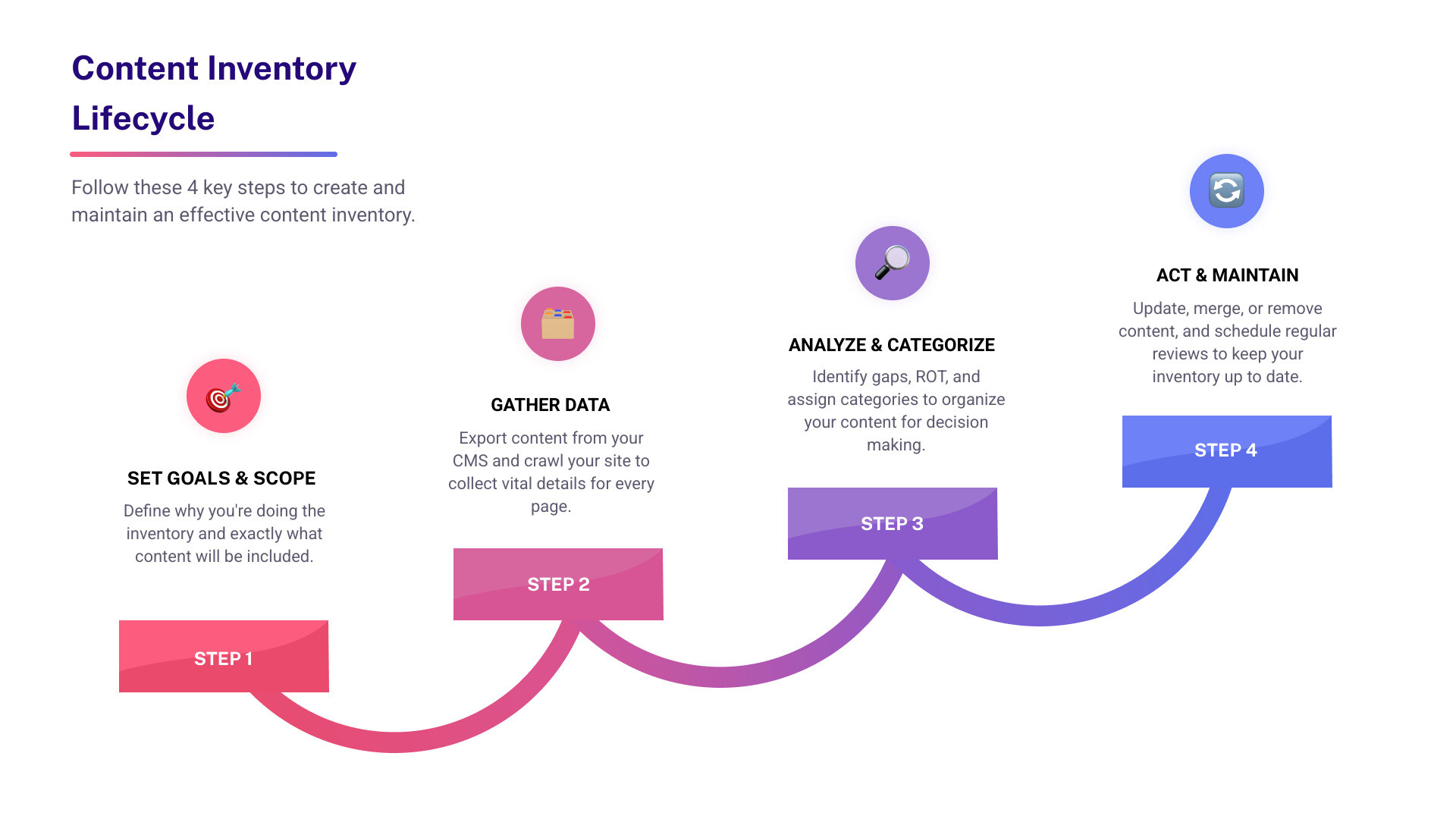
- Define clear goals – Know WHY you're doing the inventory and what you want to achieve.
- Set the right scope – Decide which sites, sections, or channels to include.
- Use a central source of truth – Export content lists directly from your CMS, not by hand.
- Track must-have data – Log page title, URL, content type, owner, last update, status, and key metadata.
- Standardize naming and taxonomy – Use consistent categories, tags, and file naming.
- Involve stakeholders – Collaborate with subject matter experts, UX, and SEO teams.
- Analyze for gaps and ROT – Identify redundant, outdated, or trivial content.
- Maintain and update regularly – Schedule follow-ups, assign an owner, and bake inventory into workflows.
- Leverage automation tools – Use crawlers, CMS exports, and templates to save time.
- Document findings and decisions – Keep clear notes on what to update, merge, delete, or create.
B2B marketers today are drowning in content chaos—messy HubSpot records, disconnected tools, and aging webpages that muddy digital strategy. That’s why understanding content inventory best practices is more important than ever.
A structured inventory isn’t just a spreadsheet exercise. It's the foundation for smarter site migrations, better SEO, and higher-performing campaigns. When done right, it shines a light on hidden content assets, identifies dead weight, and uncovers fresh opportunities.
So whether you’re prepping for a redesign, cleaning house, or aligning teams, this guide will break down every step—and give you practical tips to make your inventory drive real results.
Content Inventory vs Content Audit: Know Your Baseline
Here's where things get a bit tricky. If you've ever found yourself in a meeting where someone says "content audit" and another person says "content inventory," and you're wondering if they're talking about the same thing—you're not alone. These terms get mixed up all the time, and it's causing real headaches for marketing teams.
Let's straighten this out once and for all.
A content inventory is your quantitative starting point—the "what do we have?" phase. Think of it as taking a complete headcount of every single piece of content you own. We're talking URLs, blog posts, landing pages, PDFs, videos, case studies, whitepapers—everything. It's purely about cataloging and organizing what exists.
A content audit, on the other hand, is the qualitative deep dive—the "how is it performing?" evaluation. This is where you roll up your sleeves and assess each piece for quality, accuracy, SEO performance, user engagement, and whether it's actually helping your business goals. It's the analytical and strategic part of the process.
Here's a simple way to think about it: inventory is your map, audit is your compass. You need to know where you are before you can figure out where you're going.
According to NN/g's research on content audits, this mapping phase is absolutely critical for understanding your content landscape. Without it, you're essentially trying to optimize something you haven't fully documented.
The relationship between these two processes is important too. Content inventory best practices always start with the quantitative work—you literally cannot audit what you haven't inventoried. It's like trying to clean a house without knowing what rooms you have.
Why mixing them up stalls projects
When teams blur the lines between inventory and audit, projects hit the brakes fast. Here's what we see happening:
Terminology confusion becomes a real problem. One team member thinks they're delivering a simple content list, while another expects a full performance analysis. Suddenly, everyone's working toward different goals, and timelines stretch out indefinitely.
Project delays pile up because deliverables miss the mark. When expectations aren't aligned from the start, you end up with the wrong output at the wrong time. The marketing team might be ready to move forward with decisions, but they're still waiting for basic content lists.
Scope creep sneaks in when boundaries aren't clear. Without solid definitions, a straightforward inventory project can balloon into a comprehensive audit, complete with performance analysis, competitor research, and strategic recommendations. That's not necessarily bad, but it's definitely not what anyone planned for.
The fix is simpler than you might think: establish clear definitions upfront and stick to them. Get your inventory done first, then move into audit mode. Know your baseline before you start making judgments about what's working and what isn't.
Setting Smart Goals & Governance Before You Start
Jumping into a content inventory without a plan is like grocery shopping when you're hangry and have no list. You'll end up with too much, too little, and probably forget the essentials.
Here's the thing: content inventory best practices always start with clarity. Before you open a single spreadsheet or fire up a crawler, you need to know exactly what you're trying to accomplish and who's going to make it happen.
Start with your business goals. Are you prepping for a website migration? Cleaning house for better SEO? Getting ready for a brand refresh? Maybe you're dealing with compliance requirements or just trying to tame the content chaos that's been building up in your HubSpot portal for years. Whatever it is, write it down and get everyone on the same page.
Next, set clear scope boundaries. This is where projects live or die. Are you inventorying your main website, or does that include the old microsites from 2019? What about those PDFs buried in your resource library? The clearer you are upfront, the less scope creep you'll deal with later.
Pick your KPIs early. How will you know if this whole exercise was worth it? Maybe it's increased organic traffic, better user engagement, more conversions, or simply having a cleaner, more organized site architecture. Choose metrics that actually matter to your business, not just vanity numbers.
Don't forget about ownership and version control. Nothing kills a content inventory faster than the "who's supposed to update this?" conversation three weeks in. Assign clear roles, set up proper version control, and if you're in a regulated industry, make sure you're tracking compliance requirements from day one.
Picking the right success metrics
The metrics you choose will guide every decision you make during the inventory process. Traffic metrics tell you if people are actually finding your content—but don't stop there. Engagement metrics reveal whether visitors stick around once they land on a page. Are they reading, scrolling, clicking through to related content?
Conversion tracking is where the rubber meets the road. Are your high-traffic pages actually driving the actions you want? Sometimes you'll find that your most popular content isn't converting, while a hidden gem buried three clicks deep is quietly generating leads.
SERP position matters too, especially if SEO is a key goal. Track where your important pages rank before the inventory, so you can measure the impact of your optimization efforts later.
Assigning roles & responsibilities
A successful inventory is definitely a team sport, and everyone needs to know their position. Content owners are your subject matter experts—they know why each piece exists and who it's supposed to serve. UX leads ensure everything fits into logical user journeys and makes sense from a navigation perspective.
Your SEO analyst is the one checking metadata, keywords, and all those technical factors that search engines care about. And your project manager? They're the glue holding it all together, keeping timelines on track and making sure nothing falls through the cracks.
Strong ownership prevents what we like to call "abandoned spreadsheet syndrome"—you know, that inventory document that starts strong but slowly dies as everyone assumes someone else is updating it.
Content Inventory Best Practices: The Non-Negotiables
Now for the fun part—the hands-on work that separates successful inventories from abandoned spreadsheets gathering digital dust. These content inventory best practices aren't suggestions; they're the foundation that makes everything else possible.
Let's start with inventory granularity. Think of this as choosing the right zoom level on a map. Too broad, and you miss crucial details. Too narrow, and you'll drown in data. Your goals should drive this decision—a site migration needs page-level detail, while a high-level content strategy review might work fine at the section level.
Naming conventions might sound boring, but they're your future self's best friend. We've all seen the horror show of "FinalFINAL2.docx" and "homepagenewnewestV3.html." Adopt consistent, human-readable names from day one. Trust us—your team will thank you when they're hunting for that specific landing page at 4 PM on a Friday.
When it comes to URL capture, be ruthless about accuracy. Record the full URL for every single asset. No shortcuts like "/about" or "the contact page." URLs change, redirects happen, and that shortcut becomes a dead end faster than you'd expect.
Metadata tracking is where the SEO magic happens. Log those page titles, meta descriptions, H1 tags, alt text, and structured data. This isn't just housekeeping—it's the foundation for better search visibility and user experience.
Your taxonomies need to be rock-solid consistent. Use standardized categories and tags that make sense to your whole team. If one person tags something as "case study" and another uses "customer story," you've just created a sorting nightmare.
Don't forget accessibility checks. Are your images missing alt text? Are your PDFs screen-reader friendly? Accessibility isn't just good practice—it's often legally required and always the right thing to do.
Redundancy checks will save you from the embarrassment of having three different "About Us" pages or five blog posts that say essentially the same thing. Flag duplicates and near-duplicates early.

Here's what you absolutely must track: page title, URL, content type (blog, landing page, PDF), owner, last updated date, status (live, draft, archived), word count, key metadata (meta title, description, H1, alt text), taxonomies and tags, and notes or recommendations. These aren't nice-to-haves—they're the minimum viable dataset.
Collect Phase – "content inventory best practices" for data gathering
The collection phase is where many inventories live or die. Get this wrong, and you'll spend weeks cleaning up messy data.
CMS exports should be your starting point whenever possible. Your content management system already knows what content exists, when it was updated, and who owns it. Why reinvent the wheel by typing URLs into a spreadsheet manually?
For websites, Screaming Frog crawls are your secret weapon. This tool (free for sites with 500 URLs or fewer) will grab every URL, status code, and piece of metadata faster than any human could. It's like having a super-powered intern who never gets tired or makes typos.
Server logs come in handy for complex environments where content might be hiding in forgotten corners. They can reveal orphaned pages, broken links, and assets that exist but aren't linked from anywhere.
Here's a crucial tip: never create or modify content IDs by hand. This is where things get dangerous. Use your CMS or automation tools for ID management. Manual ID changes can break links, mess up tracking, and create a data integrity nightmare that takes months to untangle.
Analyze Phase – deeper "content inventory best practices" for insights
Raw data is just the beginning. The analysis phase is where your inventory starts telling a story.
Gap analysis reveals the holes in your content strategy. Are you missing key topics your audience cares about? Do you have plenty of blog posts but zero case studies? These gaps often represent your biggest opportunities.
Content cannibalization is the silent killer of SEO efforts. When multiple pages compete for the same keyword, they often end up hurting each other's rankings. Your inventory should flag these conflicts so you can consolidate or differentiate.
ROT scoring helps you identify content that's Redundant, Outdated, or Trivial. That blog post about "Marketing Trends for 2019"? Probably time to retire it. The three different versions of your pricing page? Definitely redundant.
Decide Phase – keep, update, merge, delete
This is where the rubber meets the road. Armed with your insights, you need to make clear decisions about every piece of content.
Keep the high-performers—content that's driving traffic, generating leads, or serving an important strategic purpose. Update the good stuff that just needs a refresh—maybe new statistics, updated screenshots, or a better meta description.
Merge redundant or overlapping pages. Why have five different FAQ pages when one comprehensive resource would serve users better? Delete the dead weight—outdated content, off-brand materials, or pages that simply aren't working.
Document every decision. Future you (and your teammates) will need to understand why you made these choices. A simple note like "merged with main pricing page" or "deleted - outdated product info" can save hours of confusion later.
Remember to maintain unique, persistent identifiers for each asset. Never reuse IDs, even for deleted content. Your CMS should be the single source of truth for all content identification and management.
Tools, Templates & Automation Workflows
Let’s be honest—no one wants to spend days copy-pasting URLs or tracking down content details one page at a time. Thankfully, the right tools and workflows can make your content inventory best practices much more manageable (and a lot less painful).
Whether you’re working with a simple site or managing a sprawling B2B ecosystem, you have options to fit your needs. For smaller inventories, a trusty Google Sheet or Excel file does the trick. Set up permissions and use comments so everyone stays in sync. If you want more visibility and visual sitemaps, platforms like DYNO Mapper help map your content at a glance. For deeper, automated checks on SEO, content, and compliance, Siteimprove is a go-to solution.
For the heavy-lifting part—collecting URLs and metadata—Screaming Frog is a favorite. It crawls your site and exports everything into a manageable file, perfect for sites under 500 pages (the free version’s sweet spot). Need to go beyond basic inventory? Smartocto reports help map content, analyze its value, and provide actionable insights.
Tracking progress and ownership is easier than ever. Tools like Trello and Notion let you assign tasks, document decisions, and keep your inventory workflow moving forward. No more losing track of “who’s doing what” or that one spreadsheet version lost in the inbox void.
Free & low-cost starters
Getting started doesn’t have to mean fancy software. Most teams find Google Sheets the simplest way to launch a project—easy to share, flexible, and works well for under 1,000 items. Screaming Frog (free for up to 500 URLs) is perfect for site crawls and quick data grabs, while most modern CMS platforms let you export a basic content list to jumpstart your inventory.

Enterprise-grade options
When your inventory scales up, it’s time for enterprise tools. Siteimprove offers advanced content inventory, compliance, and SEO integrations, keeping your digital house in order. DYNO Mapper brings in-depth sitemaps and accessibility checks to the table. And for teams who want everything to talk to each other, use workflow integrations to connect your inventory with project management or analytics tools—so updates flow seamlessly, and nothing falls through the cracks.
Pro tip: If you’re dealing with a mountain of content, look for batch editing and dropdown menus instead of endless manual entry. It’s faster, less error-prone, and much easier to keep your taxonomy consistent.
By choosing tools and templates that fit your stage and scale, you’ll make your content inventory work smarter, not harder. And if you ever feel stuck or overwhelmed, remember: the right combination of automation and teamwork is your shortcut to a streamlined, stress-free inventory.
Frequently Asked Questions about Content Inventory Best Practices
Think of your content inventory like your kitchen pantry—it’s easy for things to get out of hand if you don’t check regularly. As a rule of thumb, plan to review and update your inventory at least quarterly. If you’re about to launch a site redesign, migrate to a new platform, or make any other big change, that’s your cue to do a full refresh.
For busy B2B sites, it’s smart to do a monthly spot-check of your highest-traffic or most business-critical sections. This helps you catch outdated info and creeping content clutter before it becomes a real problem.
If you’re just getting started with content inventory best practices, don’t overcomplicate it. The absolute essentials are:
* URL
* Page Title
* Content Type
* Owner
* Last Updated
* Status (like live, draft, or archived)
These basics will give you a clear snapshot of what you have and who’s responsible. Once you’re ready, you can expand your inventory to include extra details—things like SEO metadata, tags, or analytics, especially if your goals call for deeper insights.
We wish! Automation can do a lot of the heavy lifting, especially when it comes to data gathering—think crawlers, CMS exports, and basic tagging. But when it comes to the critical decisions—like whether to keep, merge, update, or delete content—there’s just no substitute for human judgment.
Qualitative review needs a thoughtful eye. You’ll want to involve team members for context and feedback, and sometimes, a bit of scenario testing. Automation streamlines the grunt work, but your team brings the strategy and nuance that robots don’t have.
For more on how to implement content inventory best practices or streamline your digital strategy, contact The B2B Mix®. We’re here to help you make sense of your content chaos and drive real results.
Conclusion
A well-executed content inventory is the unsung hero of effective B2B marketing. It drives smarter site migrations, surfaces hidden gems, and keeps your digital strategy sharp. But here's the thing—it's not a one-and-done project.
Continuous improvement is what separates the pros from the amateurs. Your content landscape changes constantly. New pages get published, old ones get forgotten, and user needs evolve. The companies that stay ahead are the ones who bake content inventory best practices into their regular workflows.
Think of your inventory as a living document. Schedule those quarterly reviews. Assign clear ownership. And don't let perfect be the enemy of good—a simple, well-maintained inventory beats a complex one that gets ignored.
The payoff is worth it. You'll stop wasting time on content that doesn't serve your audience. Your SEO will improve. Your team will finally know what content exists (and what doesn't). And when it's time for that next big project—whether it's a migration, rebrand, or campaign—you'll have the foundation to move fast and smart.
Ready to rein in your content chaos and open up maximum impact? Check out our content inventory audit checklist and services for more actionable tips—or reach out to The B2B Mix for hands-on help.
We're here to help B2B teams optimize HubSpot, streamline operations, and get real results—no jargon, just practical expertise and human support.
Happy inventorying!